
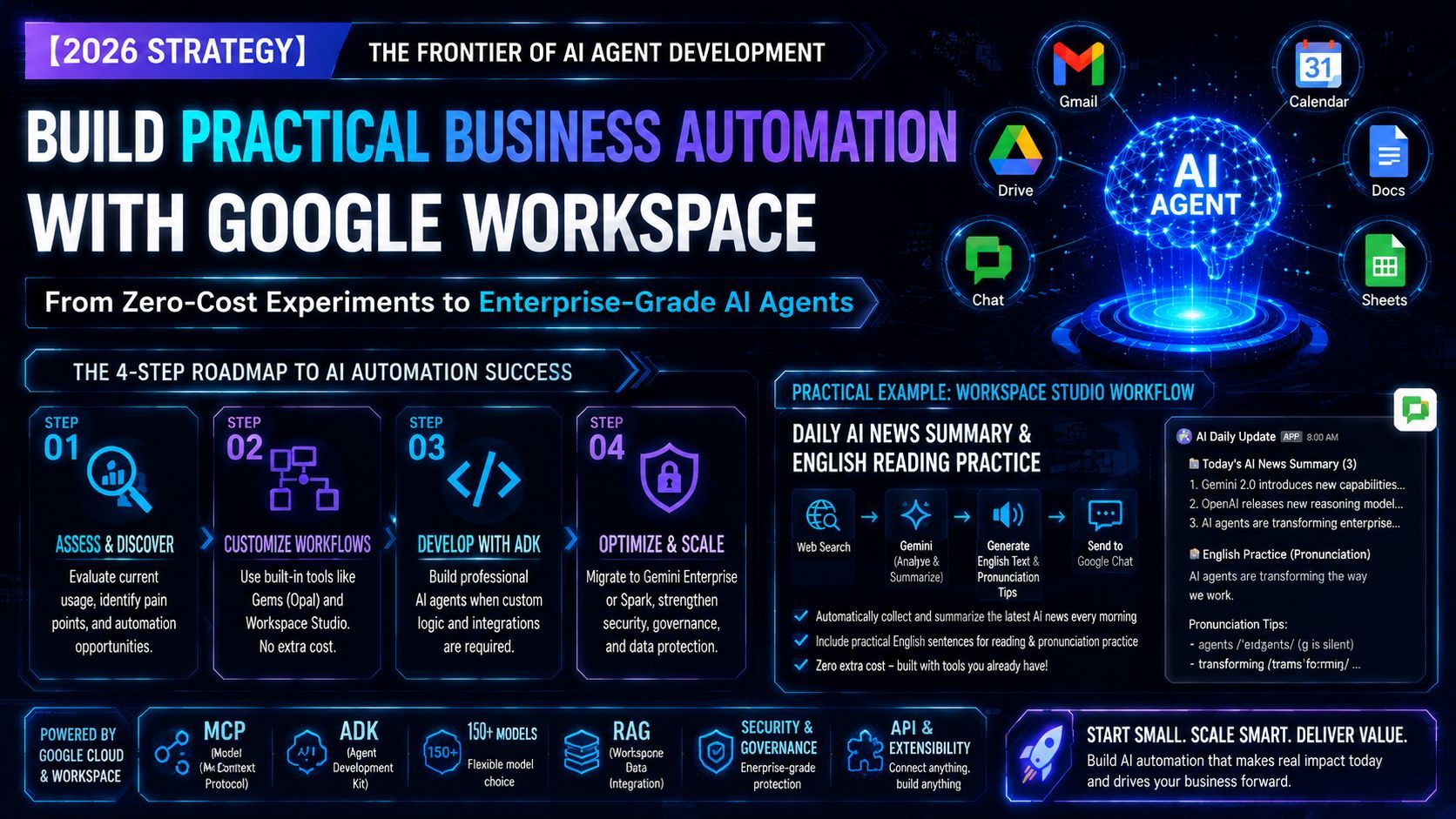
【2026 Strategy】The Forefront of AI Agent Development: A Practical Business Automation Roadmap via Google Workspace
Going beyond a simple "how-to" guide for AI tools, this article breaks down the strategic mindset needed to build and propose AI agent solutions that actually sell in the real world. It explicitly highlights how the status quo of AI adoption has shifted post-2026, offering a "customer-first," step-by-step framework that doesn't rely on expensive software licensing. We also reveal a practical hands-on workflow recipe (AI News Summary & English Practice) built on "Workspace Studio" with zero added cost, followed by a sneak peek into next-level automation for timesheets and KPI analysis.

Hey everyone! A big shout-out to all the engineers out there who are riding the wild waves of rapid AI evolution, while secretly buzzing with excitement about how to actually operationalize it in the real world.
Today, while drawing on the core concepts of "Develop and integrate AI agents with Google Workspace," I want to dive into a gritty, passionate, and highly practical strategy: "How should we, in the real-world business landscape of 2026, actually face AI and propose solutions to our clients?"
In the latter half, I'll also share a hands-on automation workflow recipe using "Workspace Studio" that you can try right away with zero extra licensing costs. So, stick around until the end!
1. Where Do We Stand with Google Workspace × AI Agents Today? Tech Doc Summary
First, let's lay down the groundwork and quickly review the latest tech trends to see where Google is heading.
The old era of "asking a chatbot a question and getting an answer" is officially ancient history. Today, we are in the era of deploying Agents that fully automate real-world business operations. Google Workspace is the ultimate foundation for this because it comes pre-loaded with an organization's real-time "data" and "interfaces"—including Gmail, Drive, Calendar, and Chat.
From an engineer's perspective, here are the most exciting highlights:
- Comprehensive development paths: Options range from completely no-code (AppSheet) to pro-code (any stack + rich APIs) for custom development.
- Full adoption of MCP (Model Context Protocol): You no longer need to build sketchy, custom API wrappers. You can securely connect local environments with organizational data in a client-agnostic way.
- The debut of Gemini Enterprise Agent Platform: It makes managing over 150 models, session handling, advanced governance, and direct RAG (Retrieval-Augmented Generation) over Workspace data incredibly seamless.
Technically speaking, "the stage is set. Now, go build."
2. Real Talk: The "Common Sense" of Agent Development Shifted Post-Next '26
This is the most critical "boots-on-the-ground strategy" I want to share and emphasize with fellow engineers.
Break Free from the Knee-Jerk Reaction: "Agent Proposals = Gemini Enterprise"
Not too long ago (prior to 2026), running a full-fledged AI agent on Google Cloud almost always required a separate, expensive subscription to "Gemini Enterprise (formerly Agentspace)," costing at least 3,000 JPY (or local equivalent) per user per month.
However, Google Cloud Next '26 marked a massive paradigm shift, changing this assumption completely.
Today, the concept of an "agent" is no longer an exclusive feature locked behind Gemini Enterprise. It can now be connected through virtually any entry point (product) that Google currently offers or plans to release. Even the Google ADK (Agent Development Kit), the core framework for agent development, is no longer a tool exclusive to Gemini Enterprise.
The underlying architecture can be a bit confusing, but please burn this into your mind: "Agent Development $\neq$ Requiring Specific Premium Licensing."
Don't Fall for Outdated "Debrief Sessions"
Through late May, many major IT enterprises based in Tokyo have been hosting "Google Cloud Next '26 Debrief & Recap Sessions." I've listened into quite a few of them, and let me be completely honest: "They are all cookie-cutter and barely scratch the surface!"
Many companies and consultants haven't yet caught up to this new paradigm shift. When a client says, "We want to build an AI agent," these consultants default to their old way of thinking:
"You need an agent? Great, let's sell you Gemini Enterprise. Then, we'll write some code using the ADK and plug your data into Gemini Enterprise."
This is nothing more than a vendor-centric sales pitch. You will never win long-term customer trust with that kind of lazy approach.
3. Our Strategy: A "Step-by-Step, Customer-First" AI Adoption Roadmap
When I or my team step in for development and consulting, we absolutely refuse to participate in that kind of "rent-seeking business model that just flips licenses."
Our job is to fire up our brains to solve the client's actual pain points, streamline their operations, and share the genuine joy when their workload becomes lighter and their results skyrocket. Locking up knowledge to profit off an "information gap" is completely unprofessional.
Instead, we propose a progressive 4-step approach:
Step 1: Audit Current AI Tool Adoption
First, we do the gritty groundwork to see how much Google's AI tools are actually being used within the organization. If they’ve just adopted Workspace, we proactively teach them the basics of Gemini and how to leverage "NotebookLM" as a research partner. By working alongside them, we pinpoint the exact bottlenecks—the places where "things absolutely won't scale unless we introduce automation and code."
Step 2: Customize Workflows with Zero Extra Licensing Costs
Instead of jumping straight into heavy agent development, we have them try out "Gems (Opal)" within Gemini, or introduce them to new workflow customization tools like Workspace Studio (detailed below). The goal here is crucial: let them feel the massive convenience of AI-driven workflow customization "while the client pays absolutely zero additional licensing fees."
Step 3: Develop Specialized Agents Using the ADK
Once we’ve pushed the standard features and Workspace Studio to their absolute limits, and we hit a phase where "we absolutely must integrate custom APIs or heavy business logic," *then* we propose full-scale agent development using professional tools like the ADK (Agent Development Kit). At this stage, the client is already convinced of the ROI, so the sign-off process is incredibly smooth.
Step 4: Organization-Wide Optimization and Security Design
As usage and the number of required agents grow, that's when we finally sit across the table to map out cost optimization.
- Is it more cost-effective to roll out "Gemini Spark (tentative name)" or switch completely to "Gemini Enterprise"?
- If there are multiple subsidiaries or partner companies, how should software licenses be allocated?
Furthermore, we provide end-to-end architecture design—handling data security on Google Cloud, permission management, backup pipelines to BigQuery for analytics, and implementing "Wiz" to guarantee overall infrastructure security. This is what real engineering looks like.
4. The Recipe: Build a "Morning AI News Summary & English Shadowing Workflow" in Workspace Studio
I can hear you all saying, "Cut the philosophy, show me the code." Here is a powerful, practical technique you can use right away.
We will use Workspace Studio with zero added cost to build a workflow that automatically collects and summarizes the latest AI news every single morning, and drops it into Google Chat along with simplified English text for reading practice.
With this setup, you don't need to shell out a premium monthly fee for "Claude Code" or other third-party tools. Every morning, before you sync with your team or clients, you can catch up on the latest AI trends while sharpening your English skills. This is a system I genuinely use myself every day.
Implementation Steps
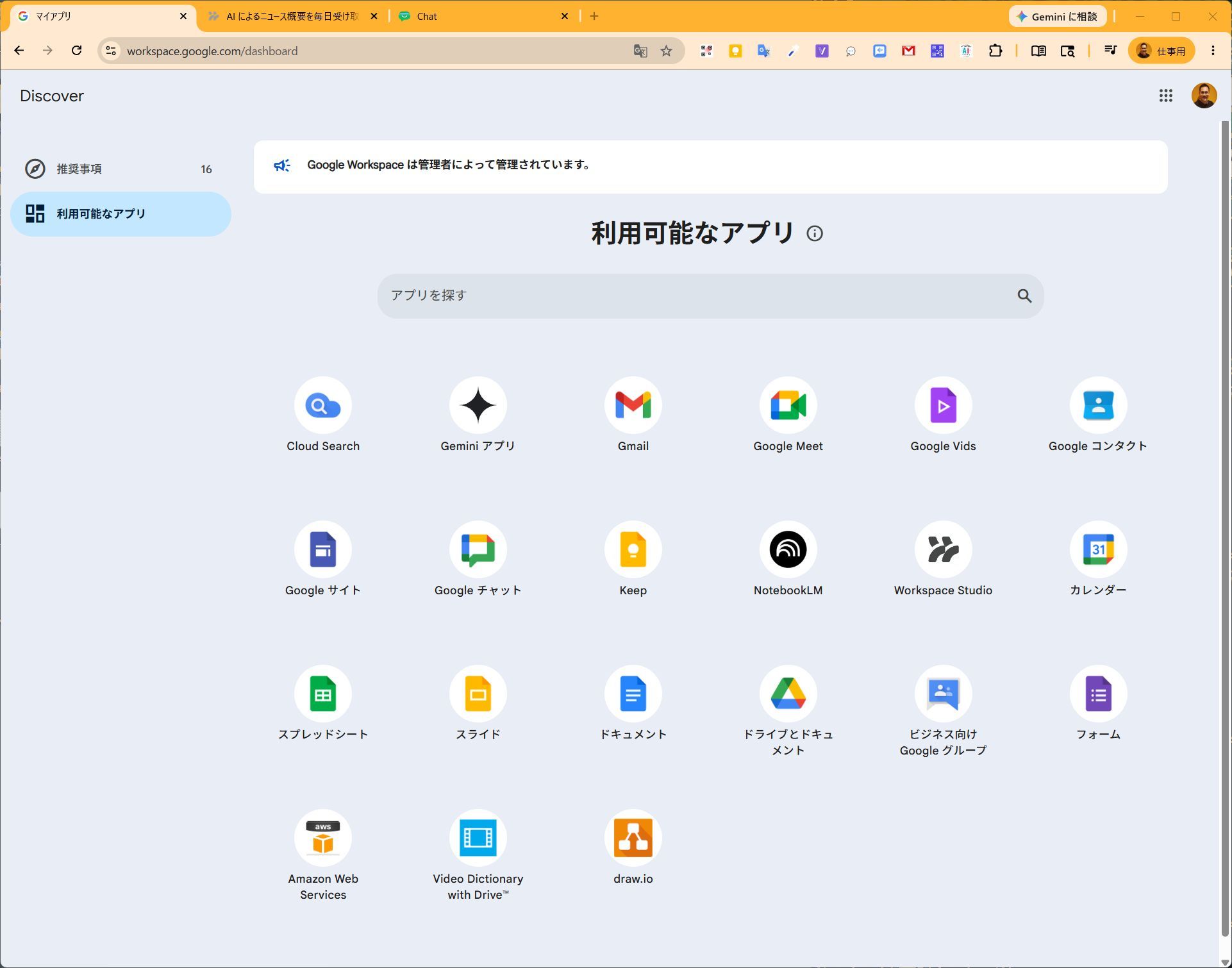
- Step 1: Open Workspace Studio
First, go to your Google Workspace Dashboard, locate "Workspace Studio," and open it. If you can't find it, go bug your internal Workspace Admin to enable it for you! 👉 Google Workspace Dashboard
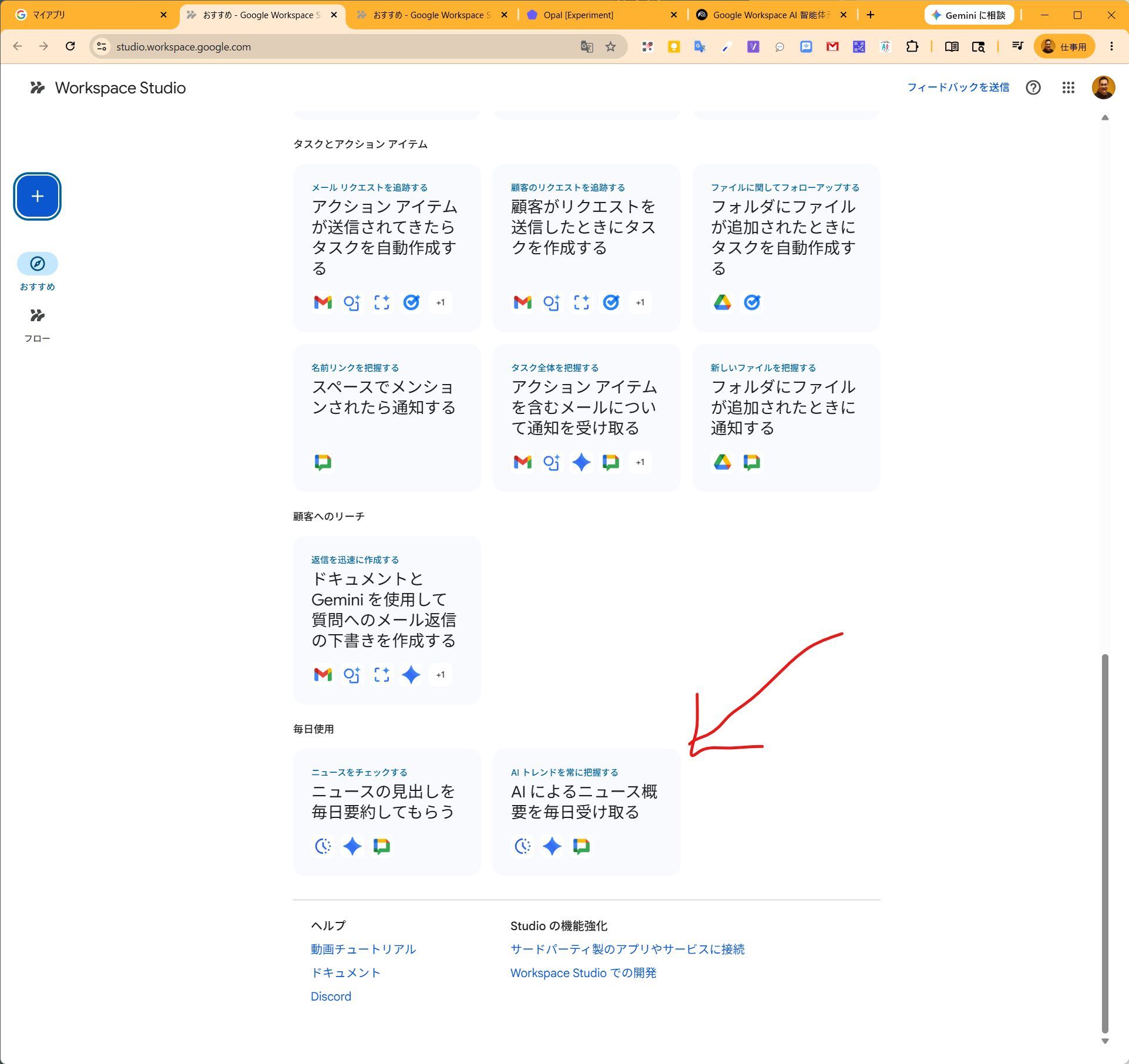
- Step 2: Find Templates and Examples
Scroll all the way to the bottom of the screen. You'll find a section showcasing actual workflow samples and use cases. We will start building based on one of these.
- Step 3: Customize Your Prompt
Add an "Ask Gemini" step (the step that utilizes Web Search) and copy-paste the prompt below, tweaking it to your liking.
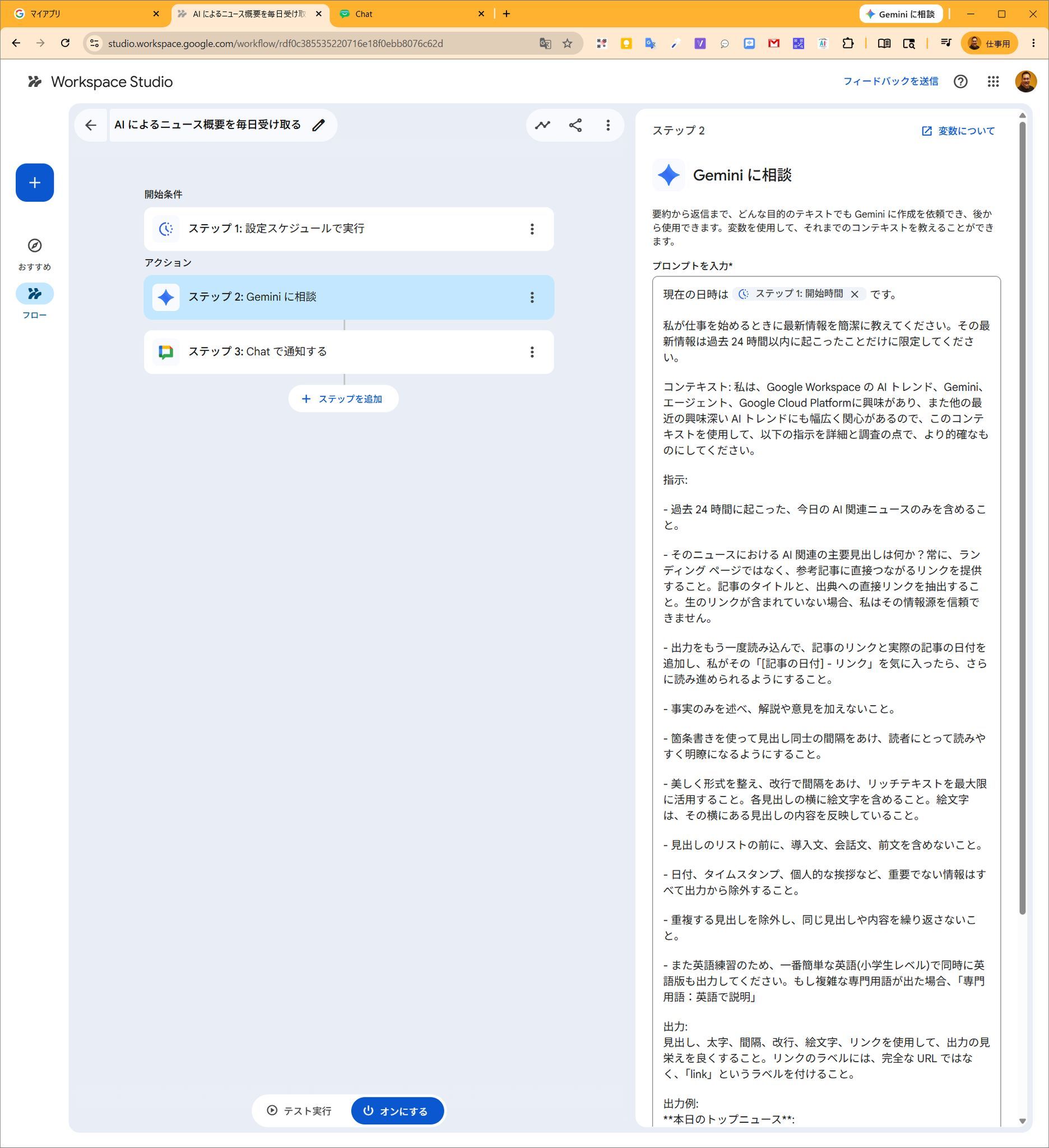
【Prompt Example】
The current date and time is [Step 1: Start Time].
Please provide a concise update when I start my workday. Limit this update strictly to events that have occurred within the past 24 hours.

Context: I am highly interested in Google Workspace AI trends, Gemini, Agents, and Google Cloud Platform, as well as broader recent interesting AI trends. Use this context to make the following instructions more precise in terms of detail and research.

Instructions:
- Only include today's AI-related news that occurred in the past 24 hours.
- What are the main AI-related headlines from that news? Always provide direct links to the reference articles rather than landing pages. Extract the article title and the direct link to the source. If raw links are not included, I cannot trust the source.
- Re-read the output and add the article link and the actual date of the article so that if I like that "[Article Date] - Link", I can dive deeper.
- State facts only; do not add commentary or opinions.
- Use bullet points to space out headlines, making it highly readable and clear for the reader.
- Format beautifully, use line breaks for spacing, and make full use of rich text. Include an emoji next to each headline. The emoji must reflect the content of the headline next to it.
- Do not include introductory sentences, conversational filler, or preambles before the list of headlines.
- Exclude all non-essential information from the output, such as dates, timestamps, and personal greetings.
- Exclude duplicate headlines; do not repeat the same headline or content.
- Additionally, for English practice, please simultaneously output an English version using the simplest English possible (elementary school level). If complex technical jargon appears, note it as "Technical Term: English Explanation".

Output:
Make the output look visually appealing using headers, bolding, spacing, line breaks, emojis, and links. Label the links as "link" rather than showing the full URL.

Output Example:
**Today's Top News**:
**Concise Headline** - Summary of the text - <link>
- Step 4: Test Run and Activate
Don't push it straight to production. Click the "Test run" button first to verify the quality of the generated summaries and English text. Once the output looks exactly how you want it, simply hit "Turn on" to activate it. Now, your personalized morning AI news and English learning material will arrive automatically every morning!
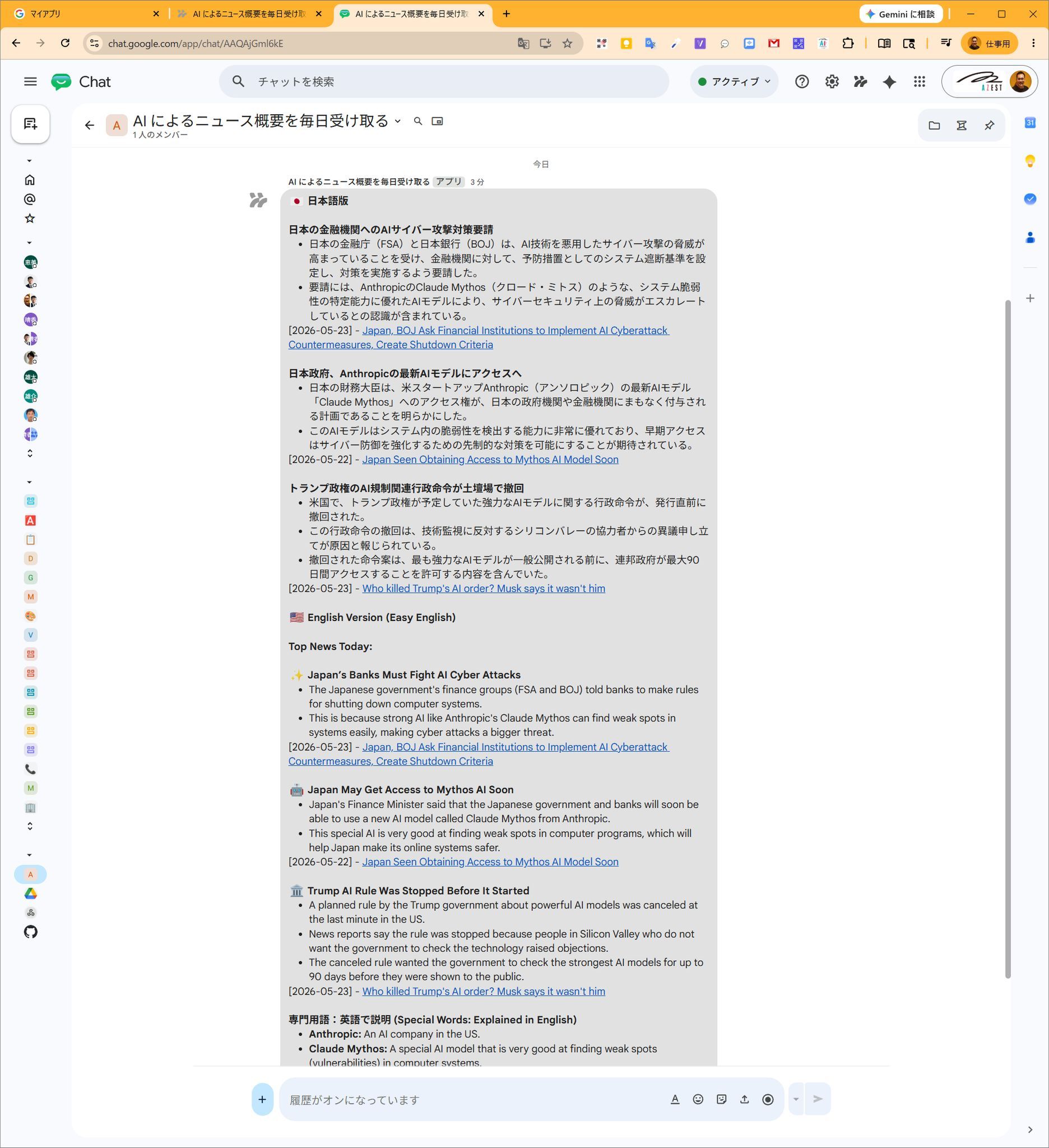
5. Next Time: Let's Toss Timesheets and KPI Analysis Over to AI Too
Today, we walked through a simple news delivery setup using Workspace Studio.
However, Workspace Studio's true potential goes way deeper than this. Next time, we're going to build a heavy-duty, highly practical workflow: "An automation workflow that automatically reads your Google Calendar schedule, generates your daily timesheet, analyzes your KPI progress for the month, and even maps out your overall contribution to the company or project."
Once you set this up, you will be completely liberated from tedious end-of-month administrative paperwork. Stay tuned!