
Design Your Solution Offerings: A Strategic Framework for Enterprise AI Platform Deployment and Adoption
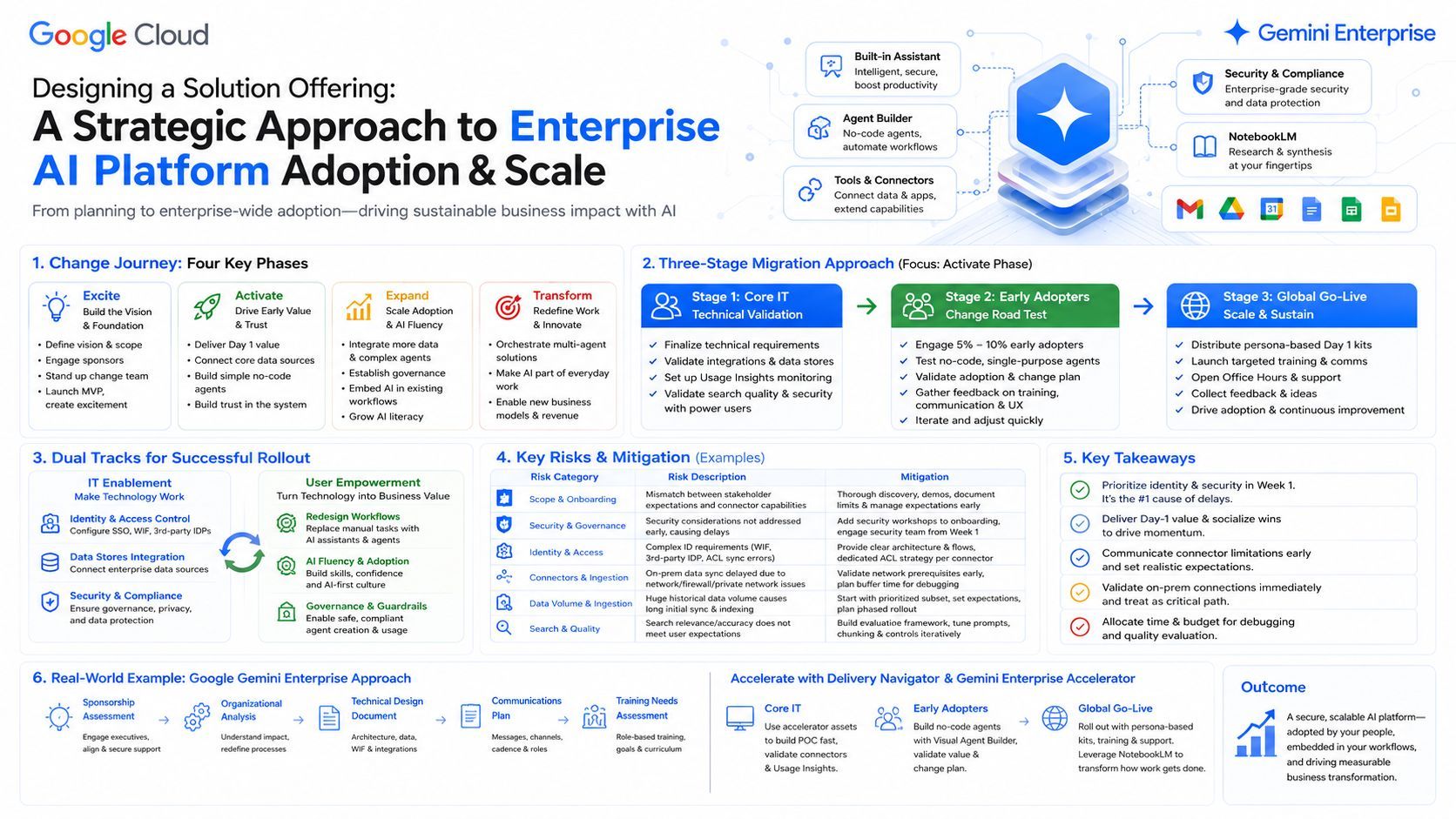
This article outlines a strategic framework for turning generative AI into solution offerings that elevate productivity. It breaks down the four engagement phases (Excite, Activate, Expand, Transform) and the proven 3-stage migration path from Core IT to Global Go-Live. It details parallel tracks for technical enablement and user empowerment alongside risk mitigation policies. Finally, a practical case study illustrates rolling out Google’s Gemini Enterprise using pre-built accelerator assets.

Design Your Solution Offerings: A Strategic Framework for Enterprise AI Platform Deployment and Adoption
In today's rapidly evolving technology ecosystem, Generative AI (GenAI) is shifting from a simple "chatbot" interface to an active, workflow-connected Agentic Platform. Translating cutting-edge AI capabilities into concrete solution offerings that truly elevate enterprise productivity is not just a technical upgrade; it is a systematic engineering process that spans organizational change management, data integration, and user empowerment. This article breaks down how to plan, deploy, and successfully drive the adoption of an enterprise-grade AI solution offering.
1. Plan the Phases of Your Engagements: Four Critical Steps
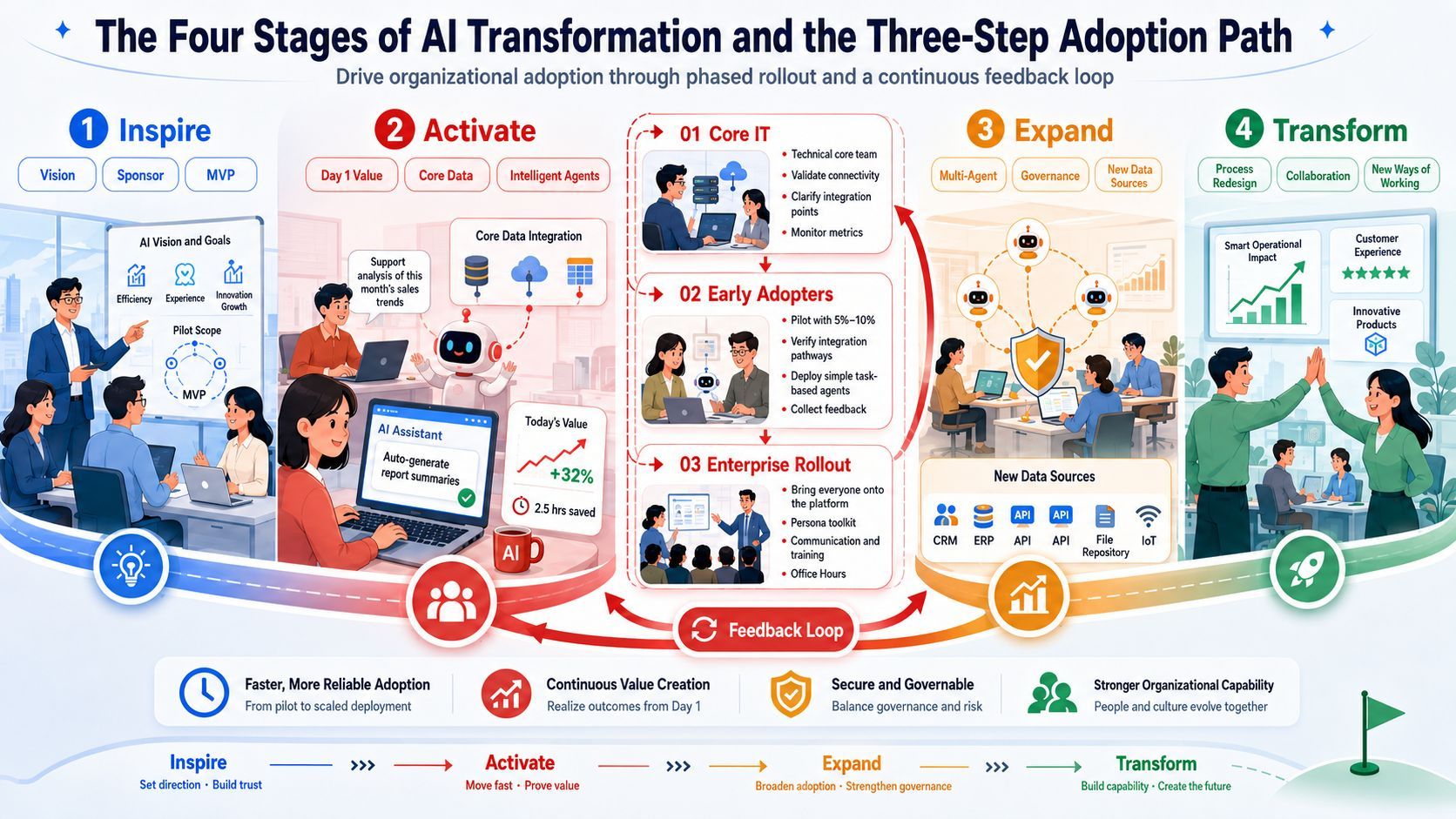
When designing the life cycle of your solution offerings, forward-looking planning for future engagements is essential. We divide the enterprise AI transformation journey into four distinct yet overlapping phases: Excite, Activate, Expand, and Transform.
- Excite —— Vision Alignment & Foundation Laying: Focuses on identifying stakeholders, analyzing organizational needs, defining the transformation vision, scope, and rollout strategy. By setting up the change management team and deploying a minimum viable solution (MVP), you build initial awareness and momentum within the organization.
- Activate —— Core Delivery & Day-1 Value: This is where the largest deployment rollout and user adoption begin. The strategy is to lead with "Day 1 value" (e.g., intuitive chat-based interaction, immediate insights from documents) to gain user trust. By rapidly connecting core data stores and developing low-complexity, starter no-code agents, you establish a solid operational foundation.
- Expand —— Value Scale & AI Fluency: Moving into the early months, the Expand phase drives sustained engagement by integrating new data sources and more complex multi-agent frameworks. This phase establishes secure agent governance to ensure operations run within guidelines while embedding AI directly into current work apps to build enterprise-wide AI fluency.
- Transform —— Workflow Reimagined & Continuous Innovation: Entering the ongoing phase, AI acts as a catalyst to completely reimagine how work gets done. It orchestrates multiple agents for complex tasks, fully integrates AI into daily tools, unlocks new business opportunities, and provides personalized AI agents for all, successfully transforming the workforce.
2. The Mature 3-Stage Migration Approach: Operational Core
The "Activate" phase is where the heaviest deployment and user transition occur. To ensure thousands of employees transition smoothly without friction, a proven 3-stage approach (Core IT → Early Adopters → Global Go-Live) spanning a few weeks is highly effective. Its operational core lies in progressive scope expansion and an iterative feedback loop.
🛠️ Stage 1: Core IT —— The Essence of Technical Validation
In this initial stage, only the core IT technical teams (IT administrators, system architects, data analysts, and a few power users) are involved.
- Operational Core: Focus on "technical integrity and metric benchmarking." The technical team confirms and tests the technical design, identifies integration points, and configures features and data connectors. Crucially, they set up and monitor usage insights so that adoption metrics can be precisely tracked across regions before a broader rollout.
🚀 Stage 2: Early Adopters —— The Essence of Change Road-Testing
This stage introduces a targeted segment consisting of only 5% - 10% of the organization.
- Operational Core: Focus on "prototype validation and change management testing." Select specific departments facing frequent use cases to experiment with lower-complexity, single-purpose agents. This enables validating the migration approach, testing the agility of the change management plan, and gathering raw feedback on training and communications to adjust the rollout strategy dynamically.
🌍 Stage 3: Global Go-Live —— The Essence of Scale Production
Bring the remainder of the organization onto the same system and transition into long-term adoption and transformation efforts.
- Operational Core: Focus on "holistic empowerment and absolute operational certainty." Key deployment tasks include:
- Distribute Day-1 Starter Kits: Avoid generic manuals. Distribute persona-based starter kits featuring function-specific use cases, sample prompt templates, and brief demo videos to encourage immediate usage.
- Communicate and Train: Establish an intentional, high-frequency communication cadence and design targeted training curricula based on role, function, and technical readiness.
- Setup Office Hours & Feedback Loop: Establish regular touchpoints and open office hours. Make it effortless for users to report technical bugs, voice concerns, or submit ideas for new agents.
3. Platform Deployment and Adoption Driving Strategies
Unlike generic SaaS adoptions, an enterprise AI platform deployment has a critical first wave—if users disengage due to poor initial experiences, the perceived value drops dramatically. Success requires a joint effort across two parallel tracks: Technical Enablement (IT/Admin) and User Empowerment.
Technical Enablement IT/Admin: Making Technology Work Perfectly
Focuses on core architectural and security configurations within the environment:
- Prioritize Identity and Access Configuration: Map out access patterns based on the identity provider (IDP). If using third-party IDPs (e.g., Microsoft Entra ID, Okta), configure Workforce Identity Federation (WIF) in the first week, and carefully set up access controls (ACLs) for deep data sources like cloud storage or big data warehouses.
- Data Store Integration: Implement hybrid search (combining traditional keywords with AI-powered semantic search) to allow users to securely retrieve data from organizational drives, emails, databases, and ticketing systems.
User Empowerment: Making Technology Deliver Business Value
Focuses on change management to build long-term AI Fluency:
- Workflow Redesign: Guide employees to transform manual, repetitive search and synthesis habits into modern workflows automated or augmented by AI assistants and agents.
- Establish Governance: When giving users permissions to build no-code agents, IT teams must implement clear governance guidelines early to manage the immediate proliferation of unmaintained "zombie agents."
4. Potential Risks and Mitigation Measures
| Risk Category | Risk Description | Potential Mitigation Measures |
|---|---|---|
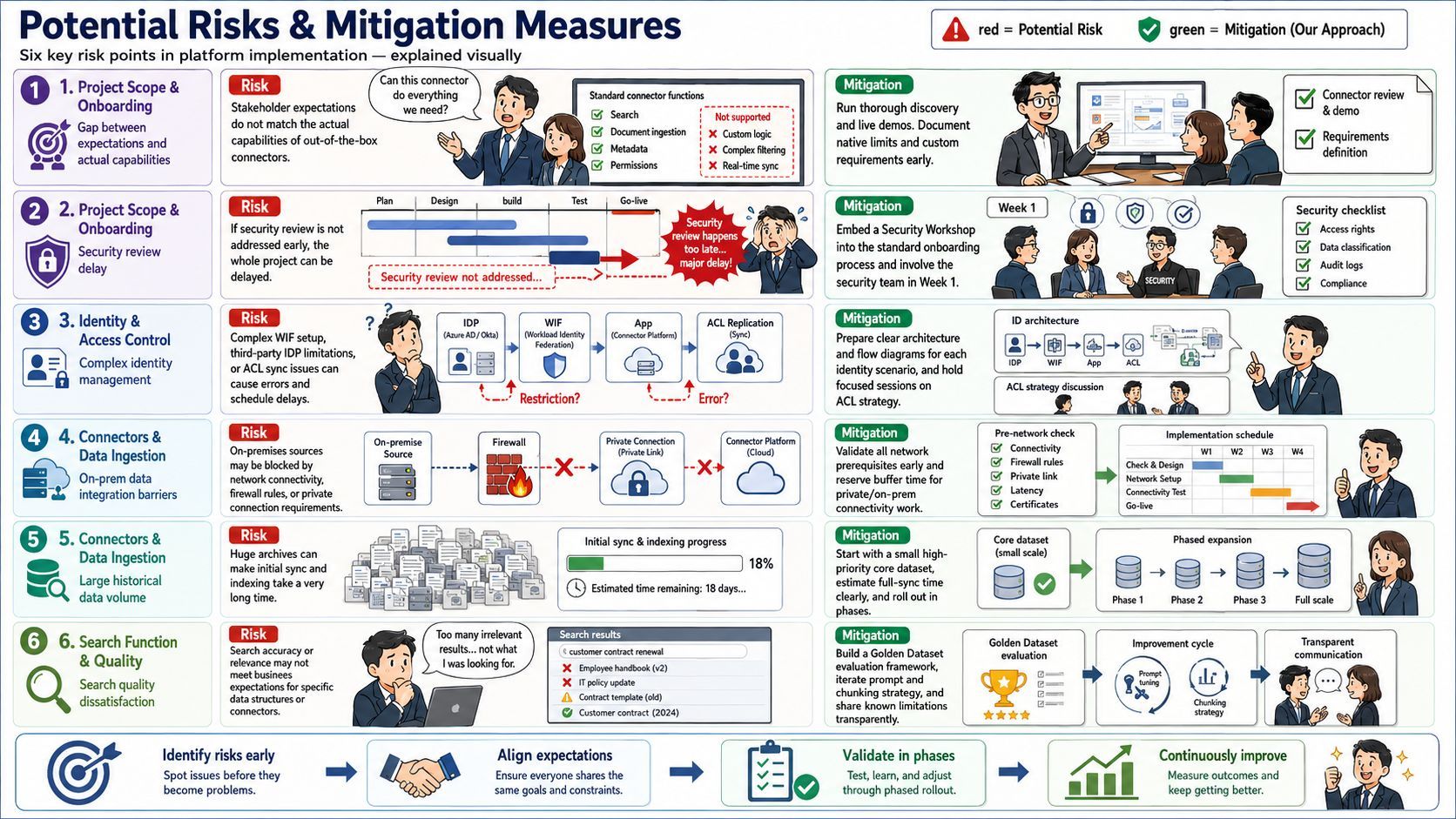
| Project Scoping & Onboarding | Mismatch between stakeholder expectations and the out-of-the-box (OOTB) capabilities of data connectors. | Conduct thorough discovery. Use a "safe questions" list and live demos to clarify supported functionalities per connector. Document OOTB limitations against customization needs early to manage expectations. |
| Project Scoping & Onboarding | Delays due to security considerations (such as connector permissions, data governance) not being addressed early. | Integrate a security workshop into the standard onboarding process. Proactively engage stakeholder security teams in Week 1 to review requirements. |
| Identity & Access Control | Complex or misunderstood identity management requirements (e.g., WIF setup, third-party IDP limitations, ACL replication issues) lead to errors or timeline delays. | Develop and share clear architectural diagrams and flowcharts for identity scenarios (first/third-party IDP, WIF). Dedicate a specific session to discuss ACL strategy and feasibility per connector. |
| Connector & Data Ingestion | Syncing on-premises data sources is significantly delayed by network connectivity, firewall rules, or private connectivity setup. | Rigorously verify all network prerequisites before project kickoff. Allocate specific buffer time in the project plan for debugging private/on-premises connectivity. |
| Connector & Data Ingestion | Initial data sync for connectors with very large data volumes (e.g., extensive historical logs or massive document repositories) takes too long. | Work with the stakeholder to define a smaller, priority data subset for initial sync to speed up evaluation. Set clear expectations on full sync duration and plan a phased rollout. |
| Search Functionality & Quality | Search results do not meet stakeholder expectations for accuracy or relevance for specific data structures or queries. | Implement a robust evaluation framework (Golden Datasets). Iterate on system instructions, data chunking strategies, and search controls. Clearly document known data-structure limitations. |
5. Key Takeaways for a Successful Engagement
- Prioritize Identity and Security: Resolve identity management (especially third-party IDPs) and connector security permissions in the first week. These are the most common sources of major enterprise project delays.
- Conduct a Day-1 Value Workshop: Successfully complete the Day-1 value experience early to socialize platform features to a broader audience and ignite organizational interest.
- Set Connector Expectations Early: Use clear guidance to set realistic expectations regarding what each connector can and cannot do out-of-the-box, particularly concerning granular ACL pass-throughs.
- Validate On-Premises Connectivity Immediately: Treat network and connectivity validation as a critical path item if connecting to local data sources, as firewall clearances often take longer than expected.
- Budget for Debugging and Evaluation: Build explicit time windows into the project plan for debugging data sync issues and running multi-stage (automated and manual) search quality evaluations.
6. Practical Case Study: Google Gemini Enterprise Rollout Approach
To demonstrate how these theoretical models function in practice, we look at Google's Gemini Enterprise platform, showcasing how to build an actionable rollout plan utilizing standard engagement resources (such as Partner Advantage and Delivery Navigator templates).
🎯 Offering Overview & Alignment
Gemini Enterprise serves as a secure, consolidated workspace homepage for employees (integrating files, calendar events, etc.) while serving as a hub for several solutions: Built-in Assistant, Conversational Agents, Tools & Data Connections, and NotebookLM. To support our customer's transformation agenda, we integrate five essential project artifacts into the solution offering:
- Sponsorship Assessment: Used during the *Excite phase* to categorize and align executive sponsors, address high-level concerns regarding data privacy, and outline a strategic communication roadmap to sustain executive commitment.
- Organizational Analysis: Details the organizational impact of the deployment across departments. It identifies affected user groups, documents current workflows, and pinpoints processes ripe for re-engineering (e.g., replacing manual cross-system lookups with the Built-in Assistant’s semantic search).
- Technical Design Document (TDD): Outlines the technical architecture, deployment topography, integration with Google repositories (BigQuery, Cloud Storage), and configurations for third-party IDPs via Workforce Identity Federation (WIF).
- Communications Plan: Defines the communication cadence and protocols among the project team, customer, and sponsors. It sets marketing messages, delivery methods, and targeted timelines for notifications surrounding the Global Go-Live.
- Training Needs Assessment: Analyzes key job roles (e.g., Finance, Sales, HR) to outline required skills, custom training courses, learning objectives, and ideal instructional durations.
⚡ Accelerating Delivery: Utilizing the Project Accelerator
During deployment execution, the project team leverages assets found within the Delivery Navigator, specifically the Gemini Enterprise Accelerator toolset.
- Core IT Phase: The delivery team uses the Accelerator’s pre-built structures and decks to quickly deploy a functional Google Gemini Enterprise staging environment within days. Data analysts and IT admins connect core data stores like BigQuery and verify that the "Usage Insights" tracking engine captures baseline adoption metrics correctly.
- Early Adopters Phase: A group of 5%-10% of users is onboarded. Leveraging the platform's Visual Agent Builder, the team guides these users to build low-complexity "no-code Conversational Agents" for common departmental FAQs. This road-tests the change management framework and validates search configurations against real user input.
- Global Go-Live Phase: The rollout scales to the full workforce. Persona-based Day-1 Starter Kits are distributed (e.g., sample prompts for finance reporting, quick demo videos for sales workflows). Simultaneously, teams are trained on NotebookLM, enabling them to instantly synthesize fragmented company manuals or project repositories into a unified "virtual research assistant" capable of generating audio overviews and briefings with a single click, completely transforming the daily workflow.
Conclusion
Designing a high-impact AI solution offering requires balancing rigid technical delivery with flexible organizational empowerment. By methodically aligning deployment activities across the Excite, Activate, Expand, and Transform phases through a disciplined 3-stage migration path, organizations build more than just a technology stack—they ignite a cultural engine that turns enterprise AI into an indispensable, long-term asset.