
OpenAI Build Hour Analysis: The "Voice-to-Action" Revolution Driven by GPT Realtime 2.0
This comprehensive report dives into the technical details of "GPT Realtime 2.0" announced at OpenAI Build Hour, alongside real-world enterprise use cases for voice AI agents. It covers everything from the ultra-low-latency end-to-end architecture, emotional expression, and advancements in tool calling, to a practical implementation guide for developers.

OpenAI Build Hour: GPT Realtime 2.0 Technical Announcement & Enterprise Practice Analysis Report
1. Overview
- Theme: Announcement of new features in GPT Realtime 2.0 and its application to productivity improvement in Voice Agents.
- Date: May 13, 2026
- Key Speakers:
- Sarah Urbanus: Head of Startup Marketing at OpenAI (Moderator).
- Terry: Multimodal HCI Expert at OpenAI.
- Erica: Solutions Engineer at OpenAI.
- Ken Murphy & Soham: Sierra Team (Enterprise AI Agent Partner).
2. Executive Summary
This session marked the official announcement of "GPT Realtime 2.0," a voice interaction model solution specializing in low latency and advanced reasoning capabilities. This version brings significant improvements to instruction-following, tool calling, and multilingual performance, driving latency down to the 200-millisecond range. Through live demonstrations of an e-commerce shopping assistant and a product analytics dashboard, OpenAI showcased a seamless "Voice-to-Action" experience. Additionally, partner company Sierra shared their "Agent Harness" architecture, designed to ensure reliability and safety for voice AI in complex enterprise environments.
3. Detailed Discussion Points
A. Evolution of GPT Realtime 2.0 Model Capabilities
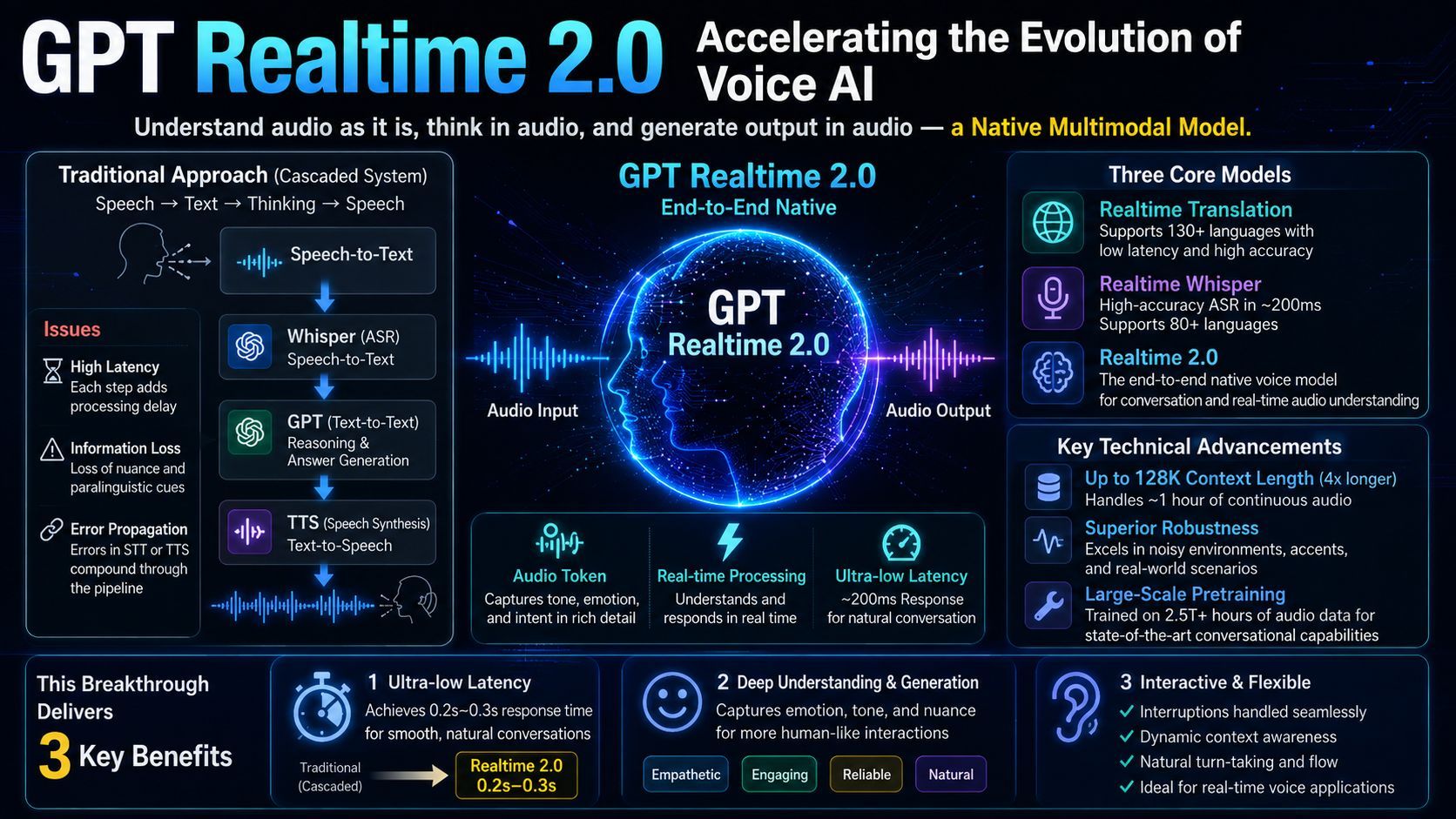
- Three Core Models:
- Realtime Translate: Low-latency streaming translation supporting over 70 input languages and 13 output languages.
- Realtime Whisper: Streaming speech-to-text with adjustable latency (as low as 200ms), supporting over 80 languages.
- Realtime 2.0: The most advanced voice reasoning model. It introduces GPT-5 level reasoning capabilities to voice and supports dynamic tone matching.
- Key Technical Advancements:
- Context Window: Expanded to 128k, four times larger than the previous version. This enables approximately 1 hour of continuous dialogue.
- Emotion and Tone Control: Capable of expressing fine-grained emotions such as whispering, excitement, and jealousy, as well as simulating natural human filler words or introductions ("Preamble").
- Tool Calling: Supports large-scale tool libraries with parallel execution of 25+ tools while maintaining the reasoning capabilities needed for complex decision-making logic.
B. Demo: Voice-Driven Smart E-Commerce SupplyCo
- Scenario: A user preparing for a hiking trip purchases gear through a voice agent.
- Technical Highlights:
- The agent checks the user's order history (knowing they have already purchased items like socks and water bottles).
- It searches web reviews in real time (identifying low-rating reviews regarding the waterproofing of a specific tent).
- It calls an external weather API to provide appropriate advice based on the precipitation forecast for the destination.
- Conclusion: Voice agents go beyond simple "chatting"; they can directly manipulate user interfaces and execute complex filtering logic.
C. Demo: Product Analytics Dashboard Metric Loop
- Scenario: A product manager uses voice commands to operate a dynamic dashboard, analyzing the causes behind a drop in active users in the European region.
- Technical Highlights:
- Voice-to-Action: Automatically executes dashboard filtering based on voice instructions.
- Root Cause Analysis: The agent automatically investigates session replays and support tickets to pinpoint a bug in the size selection feature on a specific version of mobile Safari.
- Wake Word & Mute Logic: Demonstrates high autonomy when instructed to be quiet, along with strong resilience against ambient environment noise.
D. Enterprise Practice Case Study Sierra Team
- Challenge: In Fortune 100 companies, even a 0.1% error rate can translate into severe business risks.
- Solution:
- Agent Harness: An infrastructure built outside the model to manage workflow orchestration, tool constraints, brand consistency, and PII (Personally Identifiable Information) anonymization.
- VAD (Voice Activity Detection) Tuning: Accurately determines when a user has finished speaking, even in noisy environments (e.g., on a highway or inside a car with children).
- State Recovery: Feature to maintain context across sessions in preparation for sudden call disconnections.
4. Key Decisions
- Model Positioning: Transitioning from the traditional, cascaded "Voice → Text → Voice" system to a native, end-to-end "Voice-to-Voice" architecture. This eliminates latency and information loss.
- Application Direction: Shifting focus away from simple voice chat to aggressively driving "Voice-to-Action" (execution via voice).
- Openness: Immediate release of the GPT Realtime 2.0 API, SDK, and Playground for developers.
5. Action Items
| Specific Task | Owner | Notes |
|---|---|---|
| Review technical docs & code samples | All Developers | Refer to the official OpenAI Build Hour repository |
| Verify new VAD parameters | Voice App Developers | Test detection accuracy across various hardware (mics/PCs) |
| Attend the next Build Hour | Registered Users | Topic: Agents SDK (To be held on May 28) |
| Integrate 128k context strategy | Existing Customers | Optimize information recall accuracy during long calls |
6. Potential Risks & Insights
- Handling Interruptions: The biggest hurdle in voice interaction. OpenAI now provides logic to block interruptions at specific timings, such as during the reading of legal disclaimers.
- Reasoning vs. Speed Trade-off: While Realtime 2.0 is fast, an "Asynchronous Supervisor Mode" is recommended for highly complex scenarios, where a powerful text model like GPT-4o monitors dialogue quality in the background.
- Global Trends: In mobile-first countries like Brazil and India, the acceptance of voice interaction is higher than text, presenting massive growth opportunities.
- Model Hallucination: Tasks requiring absolute precision—like spelling names or phone numbers—still run the risk of errors. Combining UI confirmation with strict structured reasoning constraints is highly recommended.
GPT Realtime 2.0: Architectural Revolution and Its Significance
GPT Realtime 2.0 is a native multimodal model. Instead of "converting voice to text before thinking," it "understands directly in voice, thinks in voice, and outputs in voice."
1. Architectural Comparison
Traditional Approach Cascaded System
A pipeline method where multiple models are chained together.
- Processing Flow: Voice Input → Whisper (STT) → GPT (Text-to-Text) → TTS (Speech Synthesis)
- Challenges:
- High Latency: The system must wait for each step to finish, creating awkward pauses or gaps in the conversation.
- Loss of Information: The text conversion process strips away all non-verbal cues, such as the speaker's emotions, sarcasm, emphasis, or a trembling voice.
- Error Propagation: A typo in the initial speech-to-text (STT) stage causes the subsequent GPT response to drift off-target.
GPT Realtime 2.0 End-to-End Native
A system where a single model directly processes voice tokens.
- Processing Flow: Voice Input → GPT Realtime 2.0 → Voice Output
- The Core Revolution:
- Voice Tokens: The model processes audio waveforms and characteristics directly as tokens, rather than relying solely on text (letters).
- Parallel Processing: It can think while listening and start speaking immediately, achieving a response speed of 200ms—equivalent to human reaction times.
2. Three Major Breakthroughs of This Shift
① Ultra-Low Latency
By eliminating intermediate text generation, responses that used to take several seconds in traditional systems have been slashed to 0.2 to 0.3 seconds. This makes natural "backchanneling" (interjections like "uh-huh") and "interrupting" possible.
② Understanding and Generating Non-Verbal Cues Prosody & Emotion
- Understanding: It directly senses whether a user is laughing, angry, or hesitant based on subtle nuances and inflections at the end of sentences.
- Expression: The model can shift between tones—such as whispering, an excited tone, or a calm tone—allowing for a much more human-like connection.
③ Flexibility in Interaction
Because audio is processed natively, advanced controls become effortless:
- Interruption Management: The moment the user starts speaking, the model immediately stops talking and begins listening to the new instruction.
- Ambient Sound Identification: It can intelligently decide whether background noises (like sirens or keyboard typing) should be ignored as noise or incorporated as useful context.
Conclusion
This update is not just a simple speed boost. It represents a fundamental evolution where the AI has truly integrated "ears" and a "voice" as an organic part of its brain.
GPT Realtime 2.0 Developer Quickstart Guide
GPT Realtime 2.0 (Realtime API) utilizes WebSockets to enable low-latency, bidirectional streaming between devices and OpenAI's servers.
Step 1: Test in OpenAI Playground No-Code
Before writing any code, you can verify the model’s performance (response speed and voice quality) directly in your browser.
- Log into the OpenAI Dashboard.
- Select "Playground" from the left menu.
- Switch the mode to "Realtime".
- Allow microphone access, and select your model (e.g.,
gpt-4o-realtime-preview) and voice (Alloy, Echo, Shimmer, etc.) in the right-hand settings panel. - Click "Connect" and start speaking.
Step 2: Prepare Your Development Environment
To build an actual application, you will need an API key and specific library dependencies.
Prerequisites
- OpenAI API Key: Create one at API Keys.
- Tier 1 or Higher Payment History: The Realtime API is currently available only to accounts with a history of paid usage.
- Node.js or Python: Official SDKs are readily available.
Step 3: Official References and Sample Code
Timed with this Build Hour, OpenAI has released highly valuable repositories:
- openai-realtime-console:
- A React-based, full-featured demo application.
- Includes audio visualization (waveforms), tool calling (Function Calling), and log checking methods.
- openai-realtime-api-dotnet / python / node:
- The latest SDKs for each language.
Step 4: Understanding Core Implementation Concepts
The Realtime API uses WebSocket instead of traditional fetch (HTTP) requests. Development revolves around controlling the following three types of events:
- Session Update:
- Configures the agent’s persona, available tools (functions), voice type, and whether to allow user interruptions.
- Item Create / Response Create:
- Sends the user’s voice or text input and requests a response from the model.
- Server Events:
- Receives
response.audio.delta(audio chunks) sent from the server and handles playback on the client side.
Step 5: Recommended Learning Path
- Run the Official Console Locally First:
Simply git clone and run npm start to get a local environment up and running that mimics the "voice-driven dashboard" shown in the live demo.
- Experiment with Function Calling:
Implement a flow where your custom-defined function is triggered when you say, "Tell me what the weather is like right now."
- Adjust VAD (Voice Activity Detection):
Tweak settings to decide whether the app should automatically detect when the user finishes speaking, or use a manual "Push-to-Talk" mode depending on your application's needs.
⚠️ Key Considerations
- Cost Management: Voice tokens have a higher unit cost than text tokens. It is highly recommended to test with brief conversations during development.
- Security Compliance: Never hardcode your API key directly on the client side (frontend), as it runs the risk of being stolen. Always route traffic through a backend server or use ephemeral (disposable) tokens in production environments.