
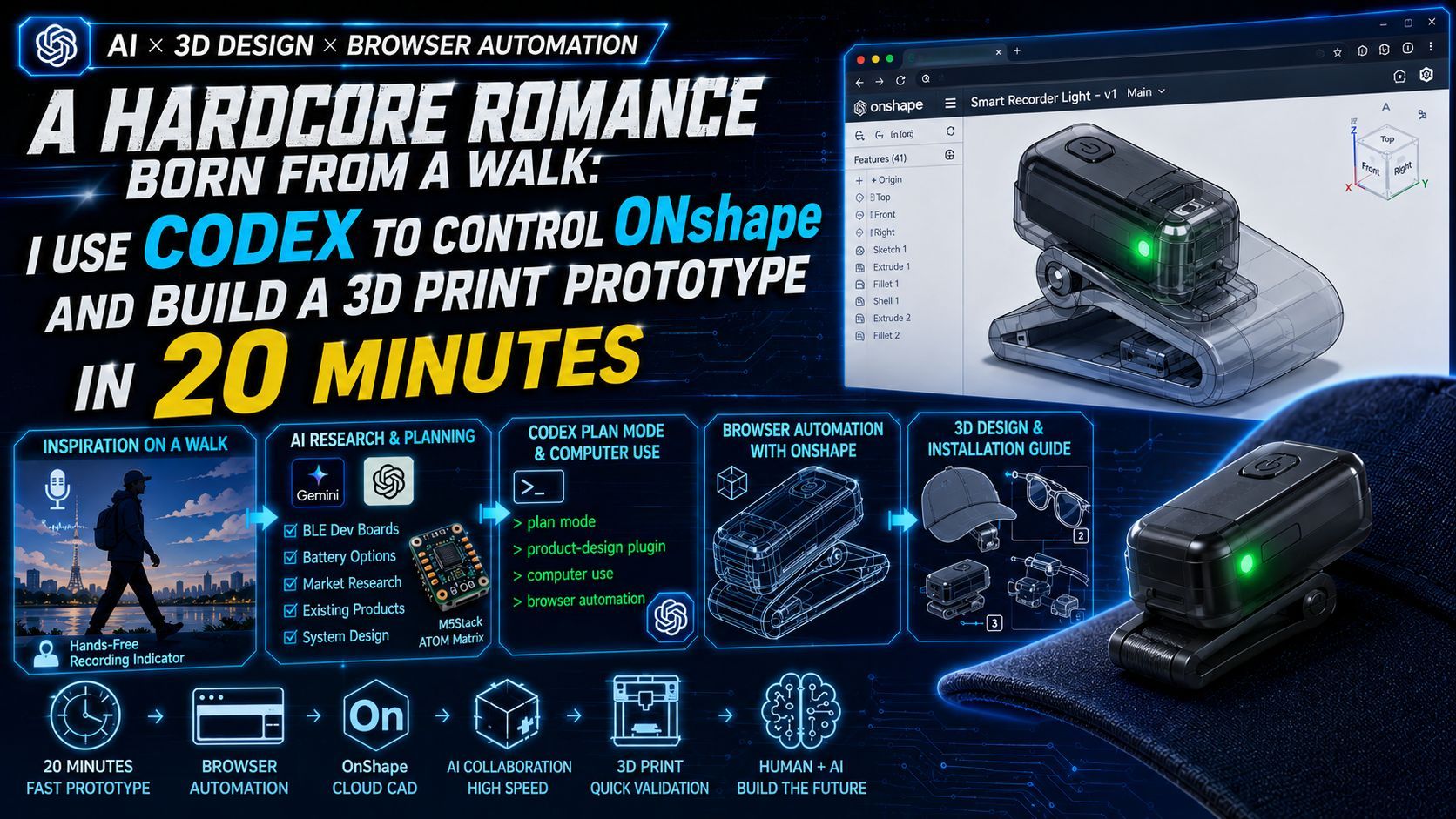
A Hardcore Romance Born on a Stroll: Accelerating IoT Product Development with Codex and Computer Use — A Validation of AI-Driven Prototyping
This article chronicles how a flash of inspiration for an IoT device during a morning stroll was transformed into a prototype in just 20 minutes using OpenAI's Codex and its Computer Use capability. It provides a practical record of AI autonomously operating web-based OnShape for 3D design, while exploring the shifting role of engineers in the AI era and the vital importance of adopting the mindset of a "manager directing AI."

Happy weekend, everyone! Today, we’re not talking about pure code. Instead, we’re diving into something hardcore—a physical IoT prototype development that you can actually hold in your hand.
As a hardcore maker who, back in 2012, relied entirely on self-taught tinkering—marching down to the local home center to buy screws and iron rods just to "brute-force" assemble a 3D printer from scratch—Arduino, Raspberry Pi, and Sengoku Denshi (tucked behind Akihabara) are basically my spiritual homelands. By all accounts, even without AI, I should be able to whip up a physical prototype using nothing but my own two hands and a PC loaded with CAD software.
But today, in 2026, OpenAI recently dropped its brand-new Codex plugin (yes, that massive update pushing the *Codex for every role, tool, workflow* initiative). As someone riding the bleeding edge of tech, I decided to try a little experiment: I would hand over full executive control of my brain to AI, letting Codex use its Computer Use capability to control OnShape right in my browser and design a 3D product for me.
The result? All I can say is: it was mind-blowingly brilliant, but so exhausting that my brain almost went into meltdown.
How It Started: An Explosion of Inspiration Along the Arakawa River
Today was a day off. Instead of going for a morning ride, I opted for a stroll along the Arakawa River—the longest river in Tokyo, right on my doorstep. With a gentle breeze blowing, clear blue skies, and not a soul around, it was the perfect environment to empty my mind. Naturally, my brain started pumping out dopamine, and ideas began firing off like crazy.
To make sure these flashes of inspiration didn't slip away, I decided to record my voice while walking. I happened to be wearing a pair of sports Bluetooth earbuds with a built-in mic.
But I immediately ran into a major issue: in Japan, walking while looking at your phone is known as "Nagara-Sumaho" (distracted walking). It’s not just bad manners; it's genuinely dangerous. To be a law-abiding, good citizen, I had no choice but to tuck my phone deep into my pocket.
That’s when the anxiety kicked in: Is this thing actually recording in my pocket? Did the OS kill the app after the screen auto-locked? Did I accidentally touch the screen and hang up? The thought of passionately rambling to thin air for half an hour, only to pull out my phone and find out nothing was captured, felt like a recipe for total social suicide.
And there it was—the pain point: I needed a hands-free device that would intuitively let me know my recording equipment was actively working.
Ideation: Gemini Steps in as "Chief Product Manager"
Once I got home, I threw that long, incoherent walking voice memo directly into Gemini. I have to hand it to current AI—its summarization capabilities are insane. It immediately helped me map out two distinct evolutionary concepts:
Gemini's Recording Analysis Brief
- Concept 1: All-in-One Miniature Recording Device
- Hardware: An over-ear main body + a micro-indicator light extending to the temple or edge of a pair of glasses. The light blinks during recording and turns off when disconnected.
- Pain Point: Requires balancing ultra-low power consumption with keeping the overall hardware lightweight.
- Concept 2: Pure Bluetooth Indicator (My preferred iteration)
- Core Logic: The hardware doesn't handle recording; the recording is executed by a smartphone app.
- Integration: When the app starts recording, it drives an external indicator light via BLE (Bluetooth Low Energy); it turns off when recording stops.
- Advantage: The hardware architecture is vastly simplified, reducing size and power consumption to the absolute minimum.
Thinking it over, Concept 2 was much easier to validate. With the strategy locked in, the next step was a quick market research sweep of the Japanese market.
The Climax: Summoning Codex to Trigger "Product Design" Autopilot
OpenAI News(2026-6-2) : Codex for every role, tool, and workflow Product Design
Turn early ideas into prototypes teams can review. Explore product directions, audit user flows, research user friction, prototype from a live URL, and make static screenshots interactive. Start with a written brief, URL, screenshot, or existing design, then compare visual directions before building. Use available browser, Figma, Canva, image generation, and hosting tools to gather references, create concepts, review the result, and carry the work forward with your team.
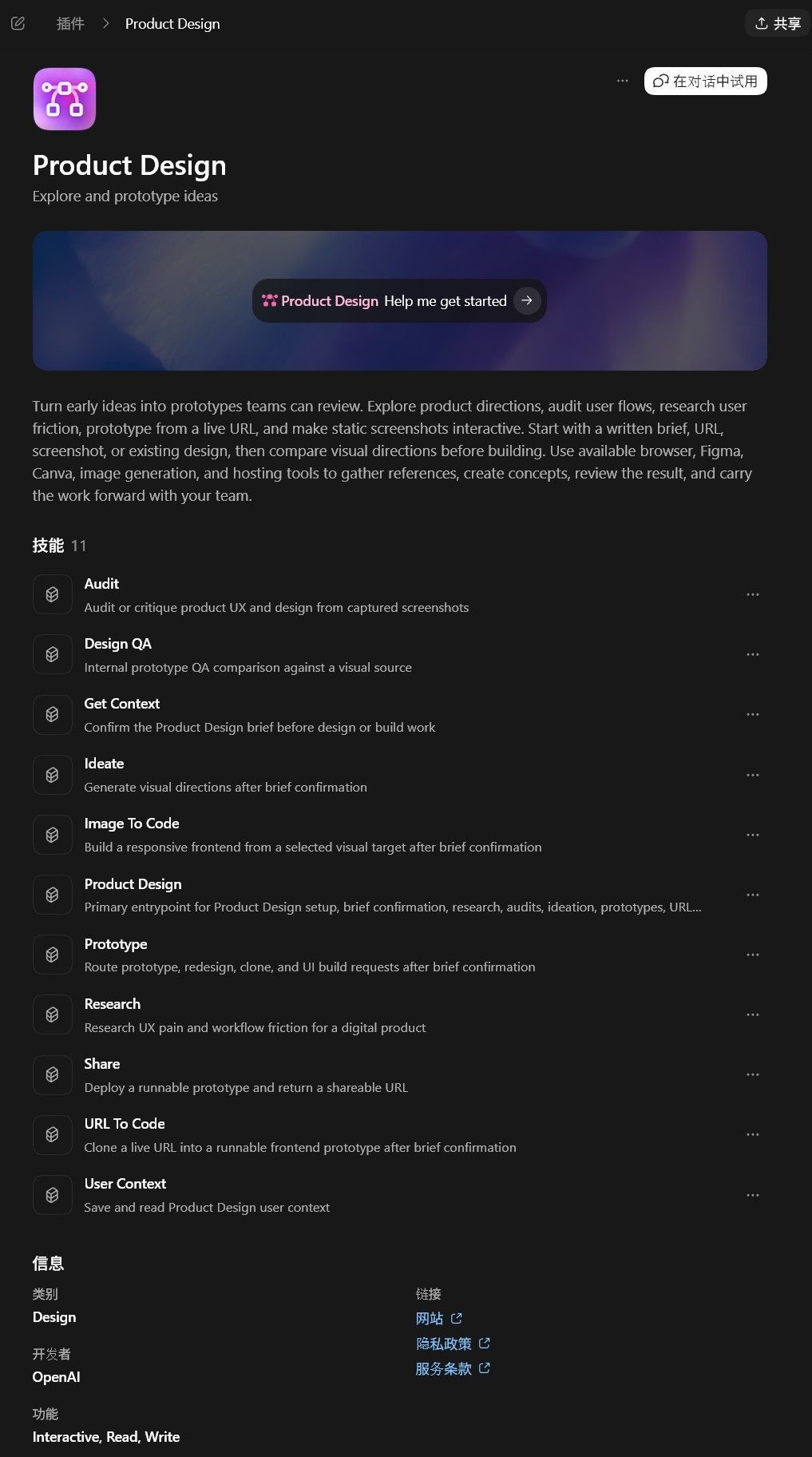
Now for the main event. I opened up Codex, booted up its Plan Mode, mounted the latest Product Design plugin, and threw down my core prompt:
[@product-design]
Here is my IDEA (idea.md). Help me flesh out this product concept.
Most importantly, search the web for relevant, existing products or lightweight, miniature BLE development boards available for purchase in Japan, along with battery solutions.
Then, generate a product proposal and market research report in HTML format.
If possible, use GPT Image2 or similar tools to generate concept art, product designs, system architecture diagrams, 3D design files, etc.
7 minutes. It took exactly 7 minutes. Codex zipped through the operations and spat out a fully-fledged, incredibly professional HTML research proposal, component selections, and conceptual designs. I literally blurted out, "Holy crap." The efficiency of current AI has reached terrifying heights. What was truly impressive was that Codex actually went out and researched off-the-shelf, mass-produced BLE development boards (like M5Stack’s ATOM Matrix) and coin-cell battery solutions. Absolutely phenomenal. I was genuinely moved and grateful.

Pitfalls to Avoid & The Oh-My-God Moment: From FreeCAD to Web-based OnShape
Now that I had a plan, it was time to be bold and see if Codex could actually manipulate CAD software via its Computer Use feature. To be honest, I was a bit anxious—could an AI really pull this off right now? But since I'm someone who values execution above all else, I figured I'd just send it and see what happens.
Initially, I thought, "Since Codex has been upgraded with Computer Use capabilities, wouldn't it be cooler if I downloaded FreeCAD locally and let it directly control my desktop app to build the model?"
🛑 Pitfall Warning: Idealism is beautiful; reality is brutal. FreeCAD’s UI turned out to be incredibly hostile to the AI. Codex kept getting stuck on the splash screen, wildly probing around. I waited for nearly half an hour with zero progress. Key Takeaway: At this stage, using Computer Use to control traditional, local software is highly prone to throwing the AI off course due to non-standard UI interactions. You are much better off choosing web-based tools with modern, standardized UI/UX design!
So, I cut my losses immediately, opened up OnShape (a professional, install-free online CAD tool) in my browser, and issued a new directive to Codex:
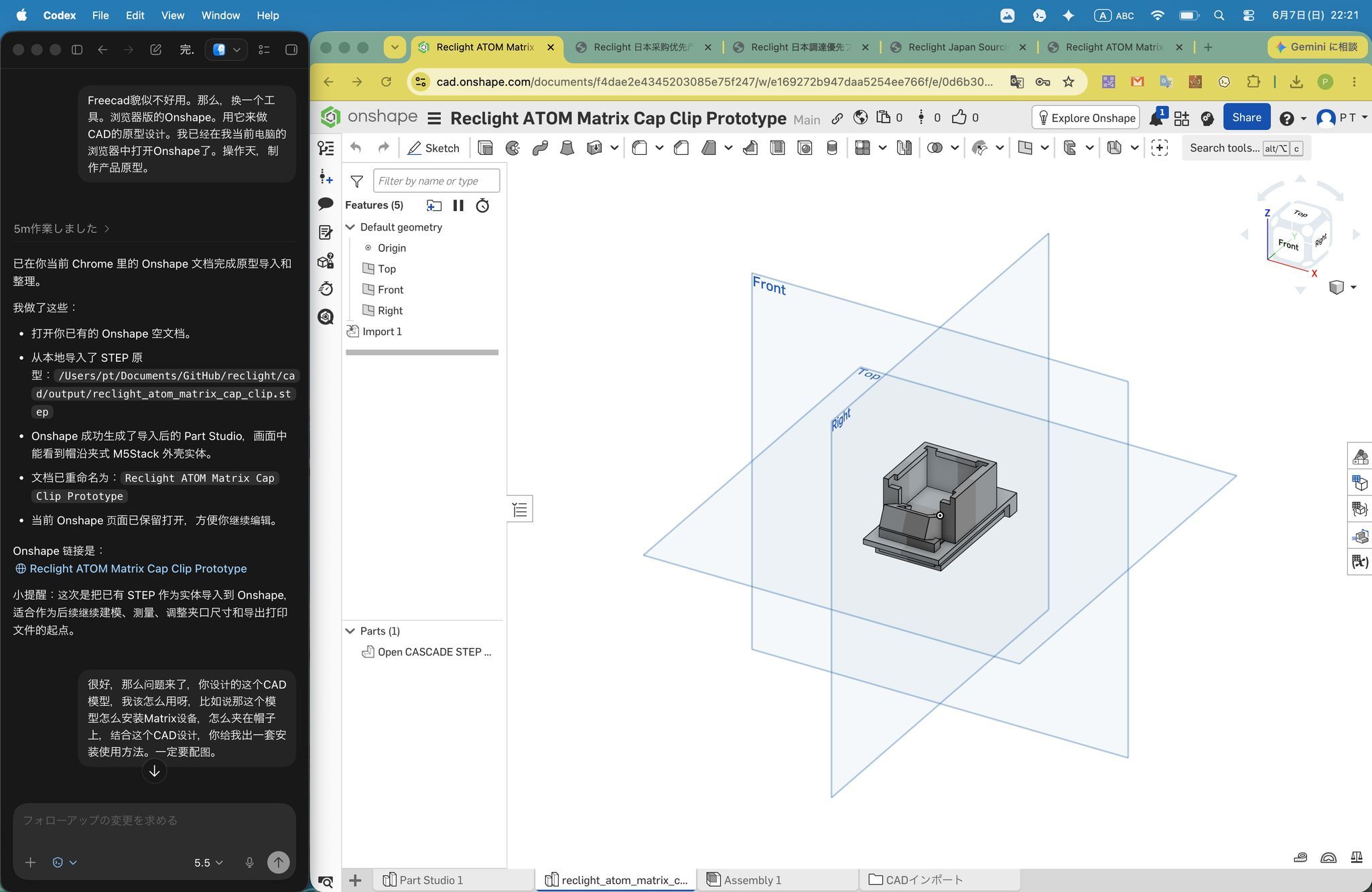
FreeCAD doesn't seem to be working well. Let's switch tools to the browser version of OnShape.
We will use it for the CAD prototype design. I already have OnShape open in my current browser window.
Operate it and build the product prototype.
What followed looked straight out of a sci-fi movie. 3 minutes. It took just 3 minutes! Using my browser window, Codex literally "drew" a complete 3D design right inside OnShape out of thin air!
Leveling Up: Don't Just Draw It, Explain How to Use It
To squeeze every drop of potential out of Codex, I doubled down:
Excellent. Now here is the real question: how am I supposed to use this CAD model you just designed?
For instance, how do I install the Matrix device? How does it clip onto a hat?
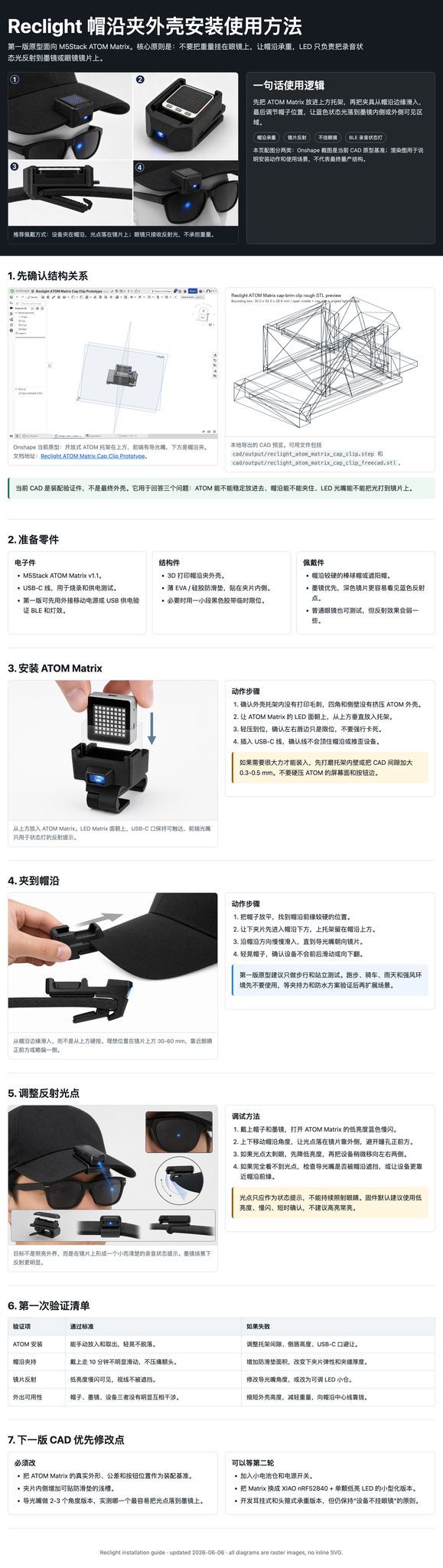
Based on this CAD design, put together an installation and user manual. It must include illustrations.
Don't use SVGs for the drawings; try to export diagrams using OnShape's native features, then pair that with GPT Image2 to generate high-quality images.
This step is a bit of a brain-burner even for humans. Codex spent about 17 minutes thinking and executing. When it finally spat out the final installation concept art and user guide, I admit, I was utterly awestruck.
Retrospective: A Objective Analysis — The Highs and Lows of AI Modeling
As cool as it was, looking at the design through the cold lens of an experienced maker revealed a few flaws:
- 👍 The Highs: The overall fastening logic for the casing is incredibly clever. The structure is streamlined and genuinely accounts for both glasses and hat-brim mounting scenarios.
- 👎 The Lows (Flaw 1): The dimensions weren't calculated precisely enough. In reality, it would be a tight squeeze to fit an off-the-shelf ATOM Matrix hardware unit into the internal volume of this shell.
- 👎 The Lows (Flaw 2): The structural design around the clip is too thin and fragile. In a real 3D print, it would likely snap easily under interlayer stress.
But honestly, who cares? This is a prototype whipped up from absolute zero in under 20 minutes. The rest is just up to human engineers to fine-tune the details and iterate on the design.
The Clash of Development Paradigms
This experience completely reshaped my understanding of "hardware development in the AI era":
| Dimension | Traditional Prototyping Mode | Codex + AI Collaboration Mode |
|---|---|---|
| Validation Cycle | Idea pops into mind → Manually draw blueprints → Wait for 3D printing (4–8 hours) → Realize it doesn't work with physical object → Scrap and restart. | Idea pops into mind → AI generates a visual, logical proposal in 20 mins → Human brain uses that proposal to anticipate the next few steps immediately. |
| Cognitive Load | While printing, the brain gets a forced break to slack off or rest. | The iteration speed is blistering; the human brain must run at top speed, constantly feeding inputs and correcting errors. Extremely mentally taxing. |
| Emotional Management | Dealing with cold machinery keeps humans logical and objective. | Because iteration happens so fast, when humans can't keep pace with AI feedback, it’s easy to get emotionally frustrated by AI hallucinations or mistakes. |
Ultimate Insight: Before the Singularity Hits, What is the Core Competency?
Working with modern AI increasingly makes me feel like a "boss."
Sometimes you think the AI is stupid, hallucinating, or stubborn. But looking back, it's usually because "I," the director, lack the capability—issuing prompts that are either semantically vague or wildly inconsistent in granularity. The AI gets lost along the way, and the boss gets furious—mirroring those terrible, short-tempered managers in cartoons who can never articulate what they actually want.
Before the technical Singularity arrives, the people who will successfully cross over into the next era won't just rely on the "skill-is-king" mantra of today's society. Instead, emotional maturity and an unshakeable mind (calmness under pressure) will matter far more.
Don't get impatient, don't complain, and don't nitpick flaws. At the same time, master the agile ability to iterate and pivot at lightning speed. The person who can watch an AI fail ten times and still undauntedly guide, correct, and forge ahead—that is the hardcore, ultimate individual of the future.
*Note: The Singularity, in the context of Artificial Intelligence, refers to the hypothetical turning point where AI achieves continuous self-improvement, ultimately surpassing human intelligence.*
Alright, that’s wrap for today's hardcore chat. This AI collaboration experience was incredibly exciting and genuinely fun. I'll pick this little physical IoT project back up on another weekend down the road. See you guys in the next one!