
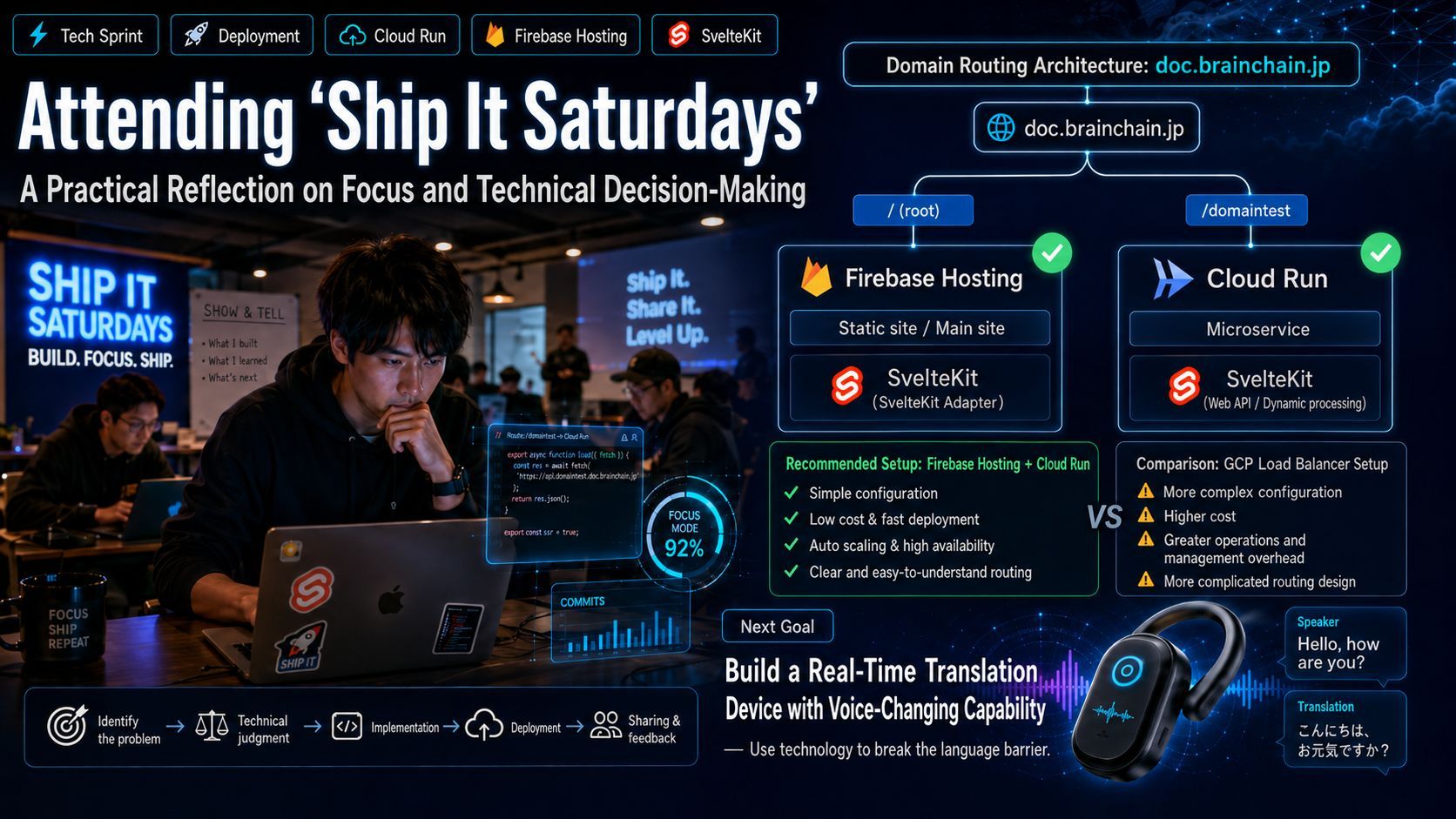
Participating in "Ship It Saturdays": Implementing Efficient Routing with Firebase Hosting and Cloud Run
I participated in "Ship It Saturdays" to tackle long-standing technical tasks. I focused on deploying a Google Cloud Run project by using Firebase Hosting to route specific paths to Cloud Run services. After comparing this approach with GCP Load Balancers, I concluded that Firebase Hosting is optimal for cost and maintenance. This post outlines the implementation steps, including SvelteKit base path configuration and firebase.json rewrite rules.

Participating in "Ship It Saturdays": A Practical Review of Focus and Technical Decisions
Today, I was invited by Eva to attend an event called "Ship It Saturdays." This was a 4-hour "sprint" session designed to provide participants with a dedicated, focused space to tackle tasks we have been putting off due to procrastination.
1.Experience and Takeaways
"Ship It Saturdays" is more than just a workspace; it is a community that helps break through professional mental barriers. It provides a space for people to explore "side hustles" or crazy new ideas. The event flow was tight and efficient: from opening doors at 10:00 to finishing at 15:00, the schedule included dedicated "build/sprint" time and concluded with a "Show-and-tell" session. After experiencing it firsthand, I felt deeply inspired. Through concentrated time blocks, I successfully broke through tasks I usually struggle with at home. Meanwhile, discussions with other participants exposed me to many fresh perspectives, which greatly expanded my knowledge. For me, communicating in an all-English environment was also an invaluable exercise.
2.Technical Challenge: Path Configuration in Google Cloud Run
During the event, I focused on deployment issues with Google Cloud Run. My core requirement was to use the same domain, doc.mydomaintest.jp, to route different paths: the root doc.mydomaintest.jp points to one site, while doc.mydomaintest.jp/domaintest points to another Cloud Run service.
After evaluating long-term development strategies, I conducted a detailed comparison between two approaches: Firebase Hosting (with embedded Cloud Run) and the GCP Load Balancer (Load Balancer + multiple Cloud Run services).
Evaluation Criteria:
Architecture Complexity:
- Firebase Hosting: Very low. It requires minimal JSON configuration and eliminates server maintenance stress.
- GCP Load Balancer: High. It requires managing static IPs, SSL certificates, VPC proxy subnets, and routing rules.
Cost:
- Firebase Hosting: Very low, often free. The quota is generous, and rewrite rules themselves do not incur additional fees.
- GCP Load Balancer: Relatively high. Regardless of traffic volume, the load balancer incurs fixed instance-hour costs (typically starting around $20-30 USD per month).
Static Resource Performance:
- Firebase Hosting: Extremely fast. It comes with a top-tier global CDN, and static resources are cached directly at edge nodes.
- GCP Load Balancer: Depends on configuration. If Cloud CDN is not configured, traffic must pass through to Cloud Run, which limits performance.
Flexibility and Scalability:
- Firebase Hosting: Medium. It is highly suitable for scenarios where the main site is static or uses front-end frameworks, while sub-sites are lightweight microservices.
- GCP Load Balancer: Very high. It supports blue-green deployments, cross-region disaster recovery, and enterprise-grade features like Cloud Armor firewalls.
Decision:
For modern full-stack projects centered around SvelteKit, Next.js, Vue, or React, the "Firebase Hosting as main + local microservices embedded with Cloud Run" approach is the best balance of development experience and cost control.
3.Technical Implementation
Once the plan was determined, I successfully completed the deployment. The core steps are as follows:
Step 1: Modify the SvelteKit base path
Configure the paths in the project's svelte.config.js file to ensure it runs on a sub-path:
import adapter from '@sveltejs/adapter-node';

/** @type {import('@sveltejs/kit').Config} */
const config = {
    kit: {
        adapter: adapter(),
        paths: {
            // Edit this↓↓↓
            base: '/domaintest'
        }
    }
};

export default config;
Step 2: Configure firebase.json
Add rules to the rewrites array to direct paths, with or without trailing slashes, to the Cloud Run service:
"rewrites": [
  {
    "source": "/domaintest",
    "run": {
      "serviceId": "Your Cloud Run Service Name",
      "region": "asia-northeast1"
    }
  },
  {
    "source": "/domaintest/**",
    "run": {
      "serviceId": "Your Cloud Run Service Name",
      "region": "asia-northeast1"
    }
  }
]
After configuring this, running firebase deploy --only hosting will complete the deployment.
4.Future Outlook
Solving this technical hurdle gives me great satisfaction. Moving forward, I have a more ambitious technical goal: to develop a simultaneous translation device with a "voice changer" feature similar to the one in *Detective Conan*, utilizing AI models (such as Gemini 3.5 Live or GPT Realtime 2) through a combination of "3D printing + IoT + App." While improving my English is not an overnight task, I will persevere, striving to communicate more fluently and integrate better into this vibrant community in the future.