
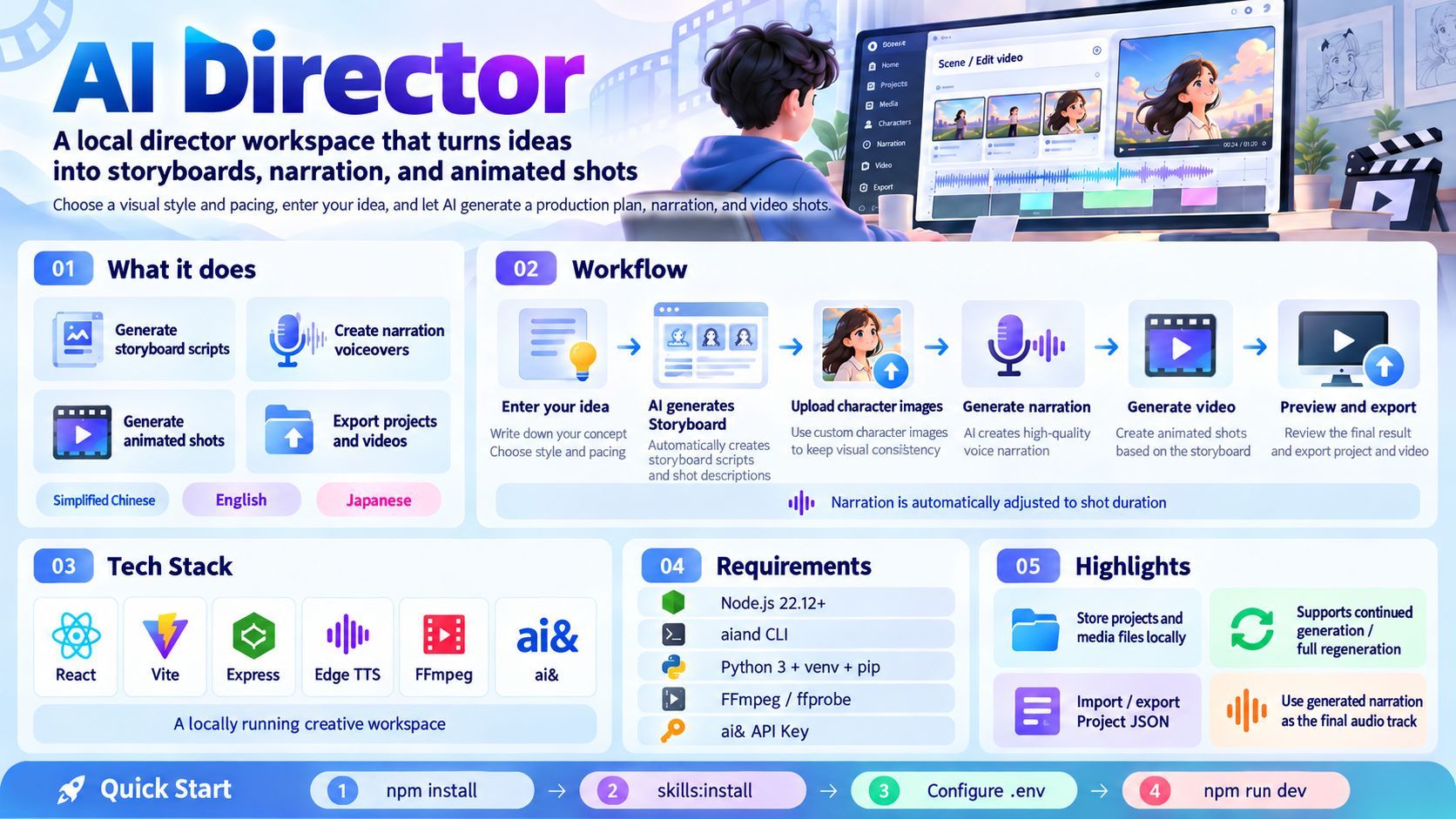
AI Director: Turning One-Prompt Video Generation into a Reviewable Production Pipeline
AI Director is a local director's workspace that breaks an idea into a storyboard, characters, voiceovers, and shots. It constrains AI output with validated project JSON, fits Edge TTS narration to each shot's duration, and generates video through ai&'s MiniMax H3. This article walks through the production flow, timeline handling, the boundaries of paid tasks, the local-first data design, and the engineering choice to load and validate the Skill explicitly.

AI Director: Turning One-Prompt Video Generation into a Reviewable Production Pipeline
AI Director is a project from Hackson '+81 Builders: Make Tokyo a Builder City'. It takes on a question that the word "generate" tends to hide: the hard part of a film usually isn't getting the first shot out—it's everything that comes after. What do you do when the narration runs two seconds longer than the shot? Is the character in the second shot the same face as the one in the first? When you close the browser and come back, are the lines you rewrote, the voice you picked, and the tasks you already paid to submit still there?
One-prompt video demos are easy to understand, but they deliver a shot, not a film. AI Director goes the other way: it breaks the director's work into stages that can be inspected separately—storyboard, characters, voiceover, shots, export—and turns them into a director's workspace that runs locally. The project is at perfact-tang/AIDirector_AI-81builders.
A film starts with a storyboard you can validate
The entry point isn't uploading source material. It's writing down what you want to shoot. You choose a visual style—realistic 3D, Japanese anime, or 2.5D—then a shot pace of 5 or 10 seconds, and describe your idea. The AI drafts the production plan from there: storyboard, characters, narration, and the prompt for each shot.
The next step is the important one. What comes back isn't free-form text that reads like a storyboard; it's project JSON. The backend loads the bundled direct-h3-storyboards Skill, puts its instructions, references, and JSON template into the model context, then validates the output with validate_storyboard.mjs; if validation fails, it retries up to twice. Only a structure that passes validation reaches the workspace.
That may look like an implementation detail, but it decides the shape of the product. Free text can only be read. A structured project can be edited field by field, consumed by later stages, exported, and reopened. The storyboard isn't a draft for the AI; it's the first contract in the pipeline.
Five stages, with a human in the loop
The workflow that follows feels more like film production than a slot machine:
- Storyboard and characters: Review the characters and shots the AI drafted, and edit dialogue, prompts, duration, and aspect ratio.
- Character images: Copy a character's image prompt, generate the image in your preferred external service, then upload and save it. The app doesn't generate character images itself; keeping this step outside deliberately leaves the choice of image model with the user.
- Voiceover: Edit each shot's dialogue and choose a voice; generate recordings one at a time or as a batch. Speech is synthesized with Edge TTS.
- Shots: Review each shot's prompt, first-frame prompt, duration, and aspect ratio. Every video uses the shot's current narration and the saved images of characters named in the prompt as references; a shot with no characters needs a scene reference image. Video is generated with MiniMax H3 through ai&'s Videos API.
- Preview and export: Check the result with sequential audio and video players, download generated files as a ZIP, and save the project JSON.
The human doesn't disappear in front of a one-click button. A person is placed at every point that needs judgment: Does the character look right? Does the narration flow? Is the shot prompt accurate? Which take needs another pass? AI drafts and generates; the director judges and chooses.
Fit the narration to the cut, not the cut to the narration
Voiceover is where this pipeline is most likely to show its seams. TTS generates audio from text, and it doesn't know the shot is only five seconds long—while the shot's duration may change upstream. Without a fix, there are only two outcomes: cut the narration, or stretch the shot.
AI Director fits every newly generated voiceover to the shot's current duration, including duration changes made later in the storyboard workspace:
- If it already fits, it stays at its original speed.
- If it's too long, FFmpeg's
atempofilter speeds it up, with an initial multiplier of original duration / target duration. - The result is measured again and corrected if needed; any remaining gap is filled with a short silent tail.
- Spoken content is not cut to force a fit.
The interface shows the original duration, final duration, and applied speed, and those values go into the exported project JSON. Duration is measured from decoded audio samples rather than the duration reported by the container, which avoids false failures from MP3 encoder padding; the same measurement is used before video submission and when restoring narration into the final video.
There is also a cache. Original TTS files stay on disk, so changing the target duration can reuse the original recording instead of requesting the same text and voice again. That saves time and API calls. For an editing process that keeps adjusting pacing, this matters more than generating faster.
Stopping generation is not canceling a submitted task
Video generation can incur API charges, so batch operations come in two modes: Continue generation keeps existing results and fills in only missing or modified shots; Regenerate from scratch remakes every eligible shot, but keeps old videos until replacements succeed.
Stopping works differently for local and remote work. Stopping voice generation also cancels the active local worker; stopping video generation only prevents further submissions. Tasks already sent to ai& cannot be canceled and may still be processing in the background. The app keeps existing task IDs for recovery, and importing a project never automatically replays paid submission queues.
The design accepts a reality: once a generation request leaves, its state is no longer fully under local control. When a submission's status is uncertain, the right move is to check the ai& console before creating another task—not to click generate repeatedly and risk duplicate charges. Cost and terms should be settled before generating: account pricing is shown in the workspace, and where required, the user must accept the video service terms in the ai& console.
Local-first, down to each file
AI Director's frontend is React + Vite, and its backend is Express. In development the frontend runs on 5173 and the backend on 3001, with /api requests proxied from the frontend to the local backend. The API key lives only in the backend's .env and never in a VITE_ variable, so it cannot be bundled into browser code.
Data has explicit destinations:
| Data | Location |
|---|---|
| Brief and interface language | Browser localStorage |
| Uploaded images, workspace edits, and generated audio | Browser IndexedDB |
| Original and adjusted MP3 files | .local/audio/ |
| Video task records, source videos, and final MP4 files | .local/videos/ |
| Installed Skill copy | .local/skills/direct-h3-storyboards/ |
Project JSON can carry character images and voiceovers, but videos are always separate local files. Moving to another computer means downloading the video ZIP and keeping .local/videos/; clearing browser data removes browser-local drafts and workspace records. Script-generation task records live only in backend memory, so export a finished project before restarting the backend.
These boundaries also explain where data goes: script briefs go to ai&, voiceover text goes to Microsoft's Edge TTS, and reference media goes to ai& when video generation is requested. Local-first doesn't mean fully offline. It means being clear, at minimum, about what stays on the machine and what leaves it.
A Skill is a contract, not a prompt snippet
direct-h3-storyboards is not a paragraph tossed into a system prompt. It has its own directory with instructions, references, a JSON template, a validator, and tests. npm run skills:install copies it into the project's .local/skills/; installation runs locally and makes no network requests, and npm run skills:verify compares the installed copy with the bundled source.
At runtime, the backend resolves the Skill in a fixed order: DIRECTOR_SKILL_PATH first, then the project's installed copy, then the bundled source directory. It does not rely on the CLI's automatic Skill discovery; it explicitly reads the instructions, required references, and project template, then validates the model output. The cost is maintaining that loading logic yourself. The benefit is predictability: with the same Skill version, template, and validation, the output structure is less likely to drift quietly when the model or the run changes.
This also means the Skill's boundaries have to be stated. The repository's Skill describes broader voice and music planning workflows, but the app currently executes only Edge TTS and ai&'s MiniMax H3; it does not run those additional generators. Separating "the documentation says" from "the product actually does" is more honest than leaving readers to guess.
What it doesn't do
- It doesn't generate character images. You generate them in an external service and upload them; shots without characters need a scene reference image you provide.
- It isn't a cloud service. Both frontend and backend are intended for local use, and the terminal has to stay running while you work.
- It doesn't put videos in project JSON. Projects can be reopened, but videos are restored from local files and ZIP backups.
- It doesn't automatically replay paid tasks. Importing a project never resubmits generation requests.
- It doesn't equate interface language with content language. The bottom-right button switches between Simplified Chinese, English, and Japanese, but that changes interface copy only; dialogue, character names, prompts, project content, voice selection, and read-aloud language remain independent. The bundled Skill intentionally generates Chinese production prompts while preserving the original language of names, dialogue, and lyrics.
What it takes to run
The dependencies are numerous but explicit: Node.js 22.12 or newer, the aiand CLI on your PATH, Python 3 with venv and pip, and FFmpeg / ffprobe with libmp3lame. On Windows, install these inside WSL. You also need an ai& API key with access to the configured text and video models.
npm install
npm run skills:install
npm run skills:verify

python3 -m venv .venv
.venv/bin/python -m pip install -r requirements-tts.txt

cp -n .env.example .env
# Add AIAND_API_KEY to .env

npm run dev
Then open http://127.0.0.1:5173/. For a production build, run npm run build, then npm start to serve the frontend and API on port 3001. The default text model is deepseek-ai/deepseek-v4.1-flash, and video generation uses minimaxai/minimax-h3. If tools aren't in their default locations, override them with AIAND_BIN, DIRECTOR_SKILL_PATH, EDGE_TTS_PYTHON, FFMPEG_BIN, or FFPROBE_BIN. Application tests use mocks or local media fixtures and never call paid generation services; FFmpeg media tests require FFmpeg on the machine.
Conclusion
What's genuinely interesting about AI Director isn't that it gets AI to generate one more shot. It's that it turns the director's decisions into a set of files that can be inspected, edited, and recovered: a validated storyboard JSON, uploaded character images, narration fitted to each shot's duration, prompts for every shot, and generation task IDs kept for recovery.
One-prompt video generation is cool, but it delivers a moment. Production is a pipeline, with trade-offs, rework, cost, and responsibility. Building that pipeline gets closer to "letting AI take part in filmmaking" than generating one more beautiful shot.