
Voice to Action Is Complete: Turning Recordings into Trilingual Blogs with a CPU-Only PC and DeepSeek Harness
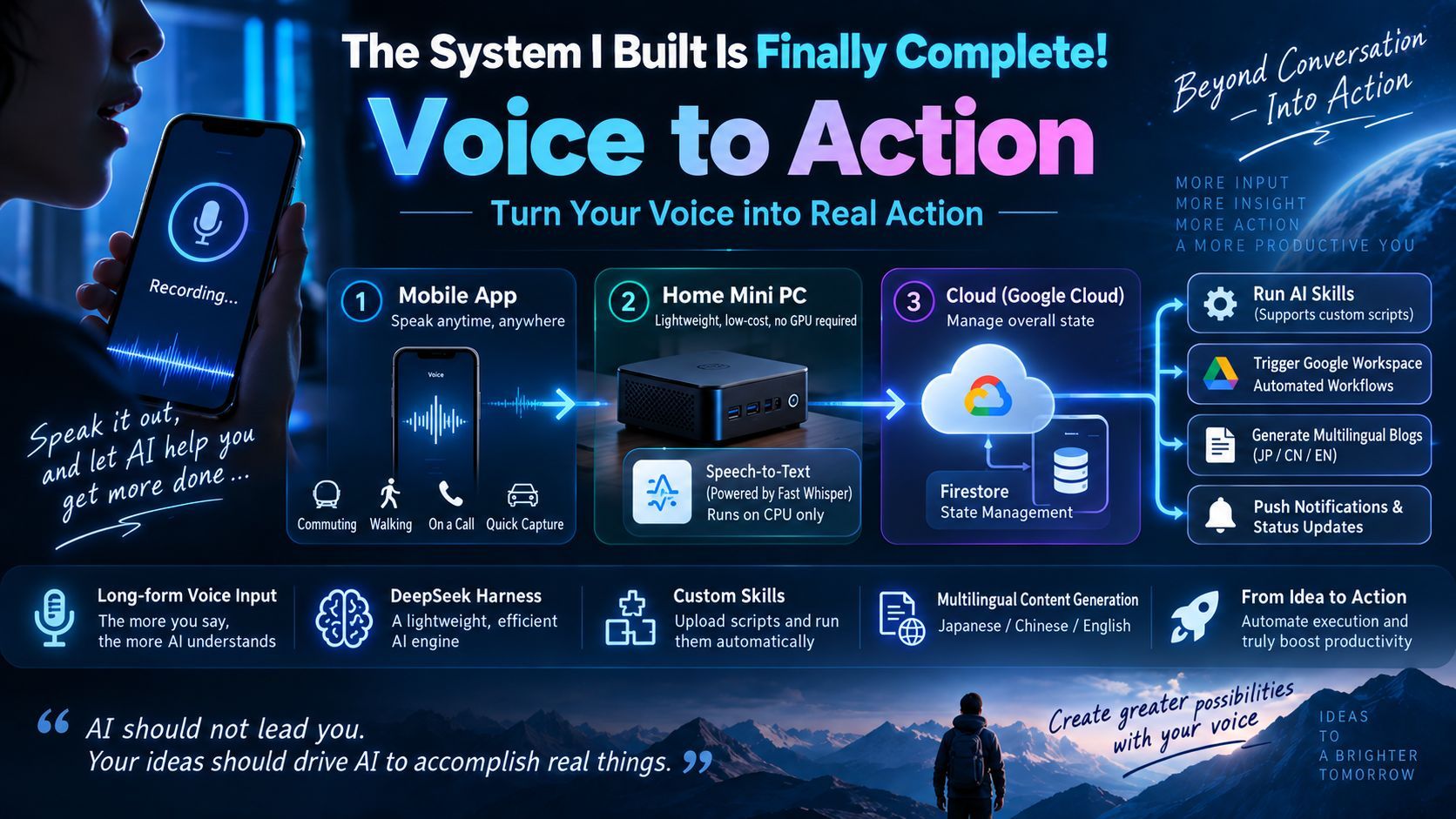
A Voice to Action system is complete. It runs on a second-hand, CPU-only PC at home as the server, with an App, the cloud, and Firestore managing state, while Fast Whisper converts speech to text. DeepSeek Harness's DeepSeek Flash model serves as the engine for script-capable skills uploaded from the cloud. Recordings become Japanese, Chinese, and English blog posts that upload automatically through an API — all lightweight and GPU-free.

The System I've Been Building Is Finally Complete: Voice to Action
1. As of Today, the System Is Essentially Done
Today, this system of mine is essentially complete. The name I gave it is Voice to Action — turning speech into action.
It consists of three parts:
- The App: the application on my phone;
- A small PC at home: placed at home, acting as the server;
- The cloud: responsible for maintaining the state of the whole system.
So what exactly does it do? It is different from the chat-style AI we have known until now.
2. The Essential Difference from Chat-Style AI
What I've built is called Voice to Action, and its core is "you talk."
It is a thing for "saying a lot." You can keep talking, say a great deal, and then this system analyzes and processes what you've said.
This differs from the traditional kind of conversation — the ChatGPT kind — in concept, in philosophy, in the form of operation, and in UX:
- A conversation is "you ask one question, it answers one"; "you ask one, it answers one";
- Moreover, the content you ask about, and the length and depth of what it answers, are often even greater than the question you asked. This produces a phenomenon: with so-called (conversational) AI today, people throw in just a word or two, and then they get dragged along by the AI.
My Voice to Action, by contrast, is this: whether you're on a phone call, out for a walk, or just talking with AI the whole time — in short, you talk, and you keep saying a great deal. My system extracts and distills information from the words people speak, and then summarizes it into something else for you.
So the essential difference is that it is centered on the human's intention. First of all, a person must be able to express themselves and to input a lot. That is the first difference.
3. The Second Thing I'm Happy About: I Built Something Extremely Lightweight
Let me first introduce my core — that small PC sitting at home, the core AI part.
3.1 Hardware: A Second-Hand Small PC with Only a CPU, No GPU
It's a second-hand small PC, with only a CPU — not even a GPU.
It's like an "AI butler" in your home, but it isn't as complicated as the so-called agent products like "OpenClaw" or "Hermes Agent" , Mine just does very simple things.
3.2 Core Function One: Speech-to-Text
One major function in the system is Speech-to-Text:
- I use the open-source Fast Whisper version;
- I use the CPU to convert speech to text (not text to speech);
- Processing goes through my App and my cloud: once it has the recording file, it starts converting it into text.
3.3 A Local UI Monitoring Console and Many Small Details
I also built a local UI monitoring console, and it contains a lot of small details that I developed myself — that makes me happy too.
3.4 From a Windows Version → a Mac Version → a Headless Version
At first it was a Windows version, then a Mac version, and now it has become a headless (no-GUI) version.
- It auto-starts on boot;
- After it starts, it can report its own IP address: once you've installed and deployed it, you don't need to worry no matter which LAN you're on — just power it on, and after a while it will read out its own IP address through the PC's sound (speaker), so you can go look at its processing status from anywhere on your home LAN.
This was one of the small challenges I faced when building it — auto-start on boot.
3.5 Where the Audio Files Come From: Managing State with Firestore
This is the monitoring part. Where do my audio files come from?
- I built a state-management program using Google Cloud's Firestore;
- Audio files processed on my phone are uploaded under Google Cloud's Firebase, and then I write a state into Google Cloud's Firebase Firestore;
- The entire lifecycle, and several pieces of hardware, all carry this state;
- My local program monitors that state: if it finds something new, it captures it, then downloads the audio from the cloud and converts it into text.
That's the first step — and the first function.
4. The Second Core: Rebuilding DeepSeek Harness
That day I also developed another core in the PC that I think is especially, especially good — also something I only started building in the last couple of days. I built a CLI execution engine based on DeepSeek Harness, and I'm personally especially, especially excited about it.
4.1 Using Only DeepSeek Harness's DeepSeek Flash Model as the Engine
My thinking is this: use only DeepSeek Harness's DeepSeek Flash model as the engine that runs this AI.
4.2 The Cloud Can Upload Skills, and a Skill Can Carry Scripts
I have a feature in the cloud that uploads skills. This follows the same idea as "monitoring the recording state in the cloud" that I mentioned earlier — in other words, my cloud also has what I call an AI Agent system.
Users can:
- Set, in the cloud, which analysis method I use;
- Write a skill themselves;
- And the skill can itself carry a script.
This is where it differs from others. As of (this year's) April and May, including Google's ADK, you were not allowed to upload skills. Mine, by contrast, can upload them — and not just the kind of skill that "can't be converted": an ordinary skill can't write scripts, whereas mine can execute scripts.
After you upload it, once the recording is converted to text, it switches to the next state — namely, which AI should process it.
4.3 Two Modes / Two Services at Present
The first: Google Workspace Studio.
- I define it in my CMA: which workflow, already defined in Google Workspace Studio, you mainly want this text to be processed by;
- But anyone who has used Google Workspace Studio knows that it isn't really about defining "a workflow" — rather, it triggers when it detects that a file has been created in a certain folder;
- So one of the functions of my AI server is: upload the converted text into the designated Google Drive folder you previously defined on the web page, to automatically trigger Google Workspace Studio.
- This was a July/August thing; it's already built, and it works quite well.
The second: a completely new one.
It's what I just described: I installed DeepSeek Harness on my own PC, and then wrote a global command-line tool (CLI).
What this CLI does is:
- After you define a skill online and upload the skill's (archive) file;
- I first check whether it is installed locally; if it isn't, I install it;
- Then I launch DeepSeek Harness through the CLI.
That's pretty cool. People usually use things like Codex — aren't they all command line? You have to start them yourself and run them yourself with commands. When it finishes, it returns to me inside the App and sends a push notification. I've got that working.
From now on, all I have to do here is add skills: define a skill, add a skill. This has become an AI Agent engine. And look — it runs on a little junk PC locally, and it's extremely lightweight.
If I want to put it in the cloud, it doesn't need to run all the time either. It could be made into something like Docker-based or Cloud Run-based auto-start: it wakes up when there's a service, and lets it sleep when there's none — that kind of feeling. This part is especially lightweight, and I'm very happy about it. And it doesn't need a GPU — it's a pretty amazing thing.
All it does is run skills. So if you develop a skill locally and upload it through my cloud system, it can run. In other words, the Agent systems that others sell for millions — or even tens of millions — of yen in the market, I built myself.
5. Another Achievement Today: A Skill That Turns Recordings into Trilingual Blog Posts
I have another achievement today. While researching skills — skills can have scripts written in them — I used DeepSeek V4 Flash 4.1 to build a skill that:
- Turns my recording into a blog post;
- And translates it into Japanese, Chinese, and English;
- It also has to write its summary, keywords, and title, and organize it into a complete publishing unit (station);
- Finally, it uploads it to my blog system.
My blog system has an API, and what uploads to that API is a script (a tool). In other words, with that skill and the AI: after generating some text, the AI has to launch this script of mine, and push those four files — the Chinese MD, the English MD, the Japanese MD, and a JSON with all kinds of information — through the API script I wrote, uploading them to my blog system in one click.
I got that skill built.
The Full Pipeline Conclusion
I recorded a very long segment through my App — including this very article, which is exactly how I made it — a long stretch of speech, and then:
- It auto-uploads through the App;
- It uploads to the cloud, and the cloud changes a Firestore state;
- Once the state is updated, my local PC detects that state change;
- It downloads the recording file;
- It finds that the processing I specified is this harness — the skill named "blog upload";
- Then, on my machine, it launches the skill by name itself;
- The skill converts it into a blog post in Japanese, English, and Chinese;
- Then it uploads it to my blog system by itself;
- Then it sends me a notification, and finally sets the processing state online to "complete."
A whole pipeline like this — I built it. And I thought, "Wow, that's awesome."
It fulfills my earlier idea: a person says a great deal (says a lot), and then AI picks out the useful information and helps process it. And not only processes it — it also takes action. Action means interacting with machines: it's no longer text; it has a motion — it saved my information to another blog system online.
This is the whole new AI system I built — an AI-and-human system. So the first phase is essentially done, and I'm very happy.
6. What Comes Next
What comes next is what hasn't moved forward for a while — I've been stuck inside certain constraints.
I changed jobs; I made a career change. I haven't started yet, but the new company has me come in and look around every day. In any case, in human society, everyone has their own complicated feelings. That disturbed my own state of mind — and it made me want to settle down quietly and do my own things.
Another point: I've always been troubled by the next step of Voice to Action — what is the next step?
This is the first action, isn't it? As your actions multiply, how does your engine decide which is the "best action," and how does it decide automatically? For this part, I thought about using GraphRAG, or some other approach — but I feel I should still wait a bit.
Why do I say that? It's not that I want to chase the hype. Look — just these past couple of days, a new Jve AI Model is hot online, and it's for classification. So it's as if heaven is handing me a pillow: first, I got the lightweight AI built; next, as my Voice to Action action skills increase, what I'll develop next is a selector, and that selector will next be built with Jev — because that's exactly what I do: there's a mass of information, and then you look at which function that information actually matches. That's Jev, isn't it? It's the best, newest, innovative AI. This is a case of perfect timing — I feel very happy, and eager to try.
In short, I feel that if this thing of mine keeps developing, it will become a new kind of change. I hope it becomes something that changes human society and boosts the efficiency of work.
At the very least, rather than prompting and asking AI bit by bit, sitting there comparing things yourself, it's better to spend half an hour or an hour saying all of these things with your own mouth, and then, in this new Voice to Action form, extract the actions that are meaningful to human society — and then act. That, I feel, is the best.