
Turning Long Voice Recordings into a Multilingual Blog with One App + a Set of Servers
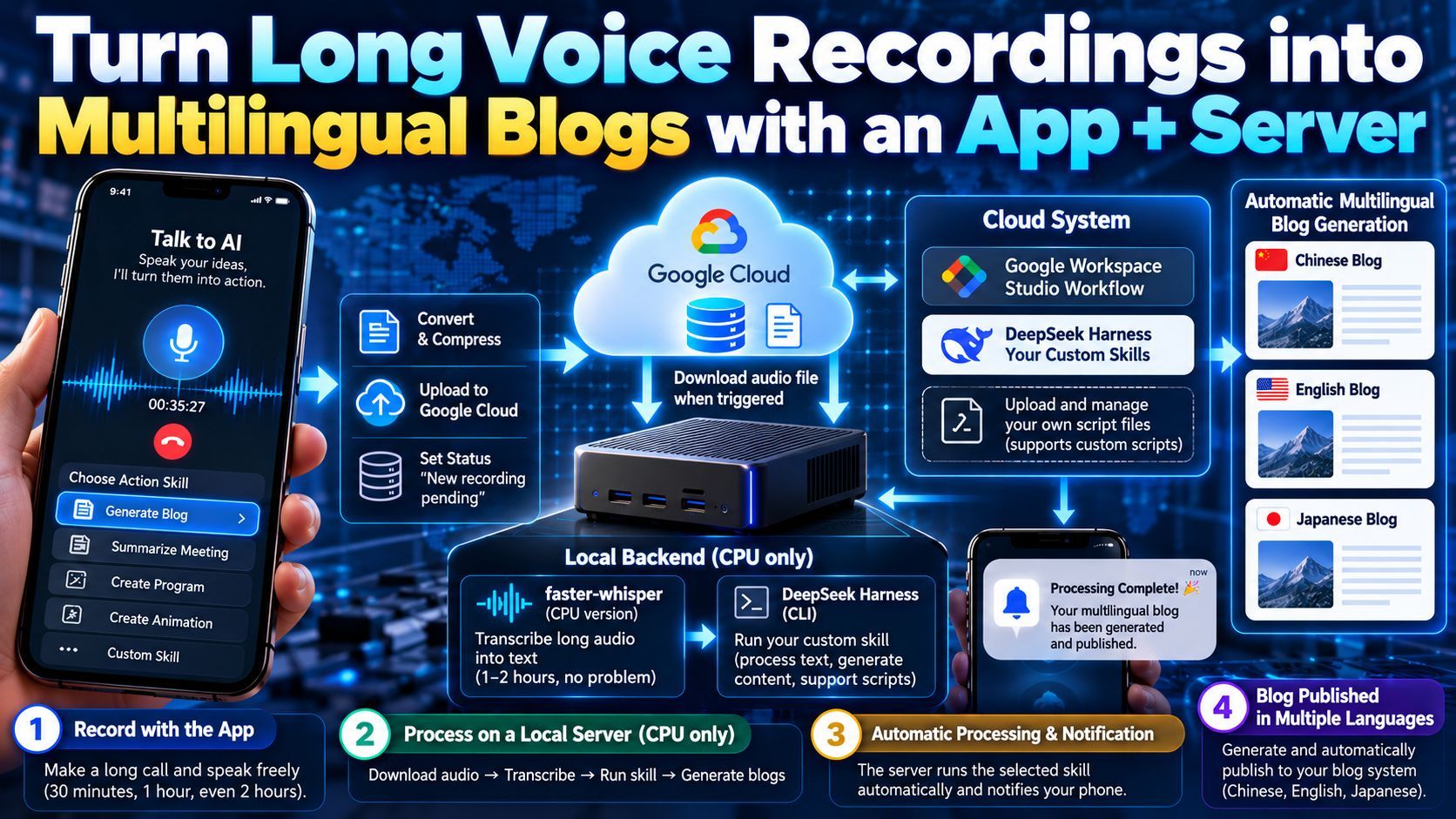
A look at a voice-processing system I built in September from one app plus a set of servers. Long call recordings are compressed and uploaded to Google Cloud, then picked up by a CPU-only, GPU-less machine that runs faster-whisper for speech-to-text and launches DeepSeek Harness as a CLI to run skills. The cloud system lets you upload your own skills and script files, and when processing finishes it notifies my phone while a script converts the content into three languages and posts it to my blog. It matches MUSE and Dota in core functionality while doing long-form transcription on CPU at very low cost. Next up is an automatic decision engine so the system can choose which Action Skills to run and in what order.

Turning Long Voice Recordings into a Multilingual Blog with One App + a Set of Servers
Intro: What I Built in September
Hello everyone. I occasionally record videos about technology. In September, I built a program made up of one App plus a set of Servers, and I'd like to share it here.
This App has no complicated features. It's very simple — it does exactly one thing: it turns your voice into the action you want.
The Mobile Side: Call, Talk, Upload
To be specific, it's an app for long phone calls. I make a call and specify which "processing department" to call — and there can be many such departments. For example, I call this one, and then I start talking: half an hour, one hour, two hours — all fine. When I'm done, I confirm the upload, and then processing begins.
What this App does is convert the audio from your phone call into another format, compress it, and upload it to my Google Cloud (that storage service, i.e. Google Cloud). My voice file gets uploaded there. At the same time, it leaves a status in the cloud: there is a recording that hasn't been processed yet.
The Local Backend: A Small CPU-Only Machine
Then I built a backend on my small CPU-only machine. This machine has no GPU, only a CPU. It constantly watches the cloud: when a status is triggered on the cloud side, this CPU machine fetches that status. There's also a voice file there, so the machine downloads that voice file by itself and processes it locally.
First, it goes and... I developed two tools on this small machine:
- One automatically converts speech to text, using the CPU version of faster-whisper. It can handle long audio — one hour, two hours, no problem.
- After transcription, I built another tool that repackages DeepSeek Harness and turns it into a CLI command.
The Cloud System: Log In with Your Own Skills
And on my side... this screen here is a system I've put on the cloud. Here I can log in to the skills I specify. Right now there are two modes: one is that you can log in to a Google Workspace Studio workflow, and the other is that you can use DeepSeek Harness and upload your own skills.
What I think is really impressive is that it lets you upload your own script files into it. Many services of this kind actually don't support script files — but I was able to support them.
The Full Flow: From Picking a Skill on the Phone to Getting a Notification
After you've uploaded it — well, I've already finished the text conversion, right? Once that's done, at first I was choosing on my phone which one to process with. I picked one — or rather, not exactly... that DSH Blog, maybe? There's a DSH Blog in this backend, right?
I can log in to my own skills app, and once I find that I want to process with this skill, my local machine checks whether it has this skill on board. If not, I download the skill from the cloud and install it here. Then, through the CLI — I built a CLI tool — I automatically start the DSH harness in the background via the CLI and run this skill.
When it finishes, once the processing is done, it sends a notification to my phone, like this. This notification tells me that it's been processed.
The Cleverest Part: A Script Turns It into Three Languages and Uploads It to the Blog
What's interesting about this whole toolchain is that you can write scripts inside the skill — you can write script, right? I added a script here. What does it do? Through a script program, it converts the content spoken in the voice into three languages, and then, through this script, uploads it to my blog system. That's roughly what I built.
How It Resembles MUSE / Dota
Actually, I'm not trying to talk about traffic or views at this point. What I mean is: people in the know will immediately see that this looks quite a lot like MUSE, which Facebook released a couple of days ago, or Dota, which OpenAI released, doesn't it? At its core, it can achieve the same functionality.
What's more, mine is mainly for long voice recordings — you can record for an hour or two without any problem. And the most bandwidth-hungry part, speech-to-text, is done by a CPU-only machine, so it doesn't cost much either. So I built this, and it achieves essentially the same functionality as MUSE and OpenAI's Dota.
On the "Voice to Action" Bet
Honestly, it may just be a coincidence, or maybe my bet was right. Several months ago I kept emphasizing that a big trend called voice to action was coming. That is, people just say something, and then, through the model I just described, AI automatically captures your intent and executes an action — carrying out that action in a way that stays as close as possible to things in your actual life. That will become a trend.
So I've been working on the same thing, and it feels like I called it right, which makes me very happy.
And as I just explained, I won't be providing the code. Because once you understand the principle, if you can do vibecoding, you can follow this approach and easily put this system together yourself.
The Next Step: Automatically Deciding Which Action Skill to Run
So what do I want to do next?
The phone screen you saw earlier is what I choose before recording: which one — I call them Action Skills — which Action Skill should operate for me.
Next, I want to add to this app a recently popular Jev — that is, an automatic decision-making engine. I'd like to try that out. And then I want to build a few more Action Skills.
What do I want it to look like? It's like this: I say a whole bunch of things, and then this program decides for itself which of my action skills can run, which one should run, and in what order — that is, at each stage, which results are left for the next action skill to process. This intermediate flow — I want to try a few of these in October and see whether I can build it.
If I can build this, then the future looks promising. What I mean is, I can just ramble and vent for half an hour, and then the actions I'm capable of — writing something for the blog, building a program, making an animation — my system will automatically decide in what order I should execute them, and then trigger them with those actions. Once this is done, it takes another step toward an intelligent stage.
Anyway, I'll keep working hard, and I'll keep playing around here and building new things. If anyone is interested, get in touch with me. I'll write the code and share it too, so we can all study it together.
Thank you, everyone!